When should you read this?
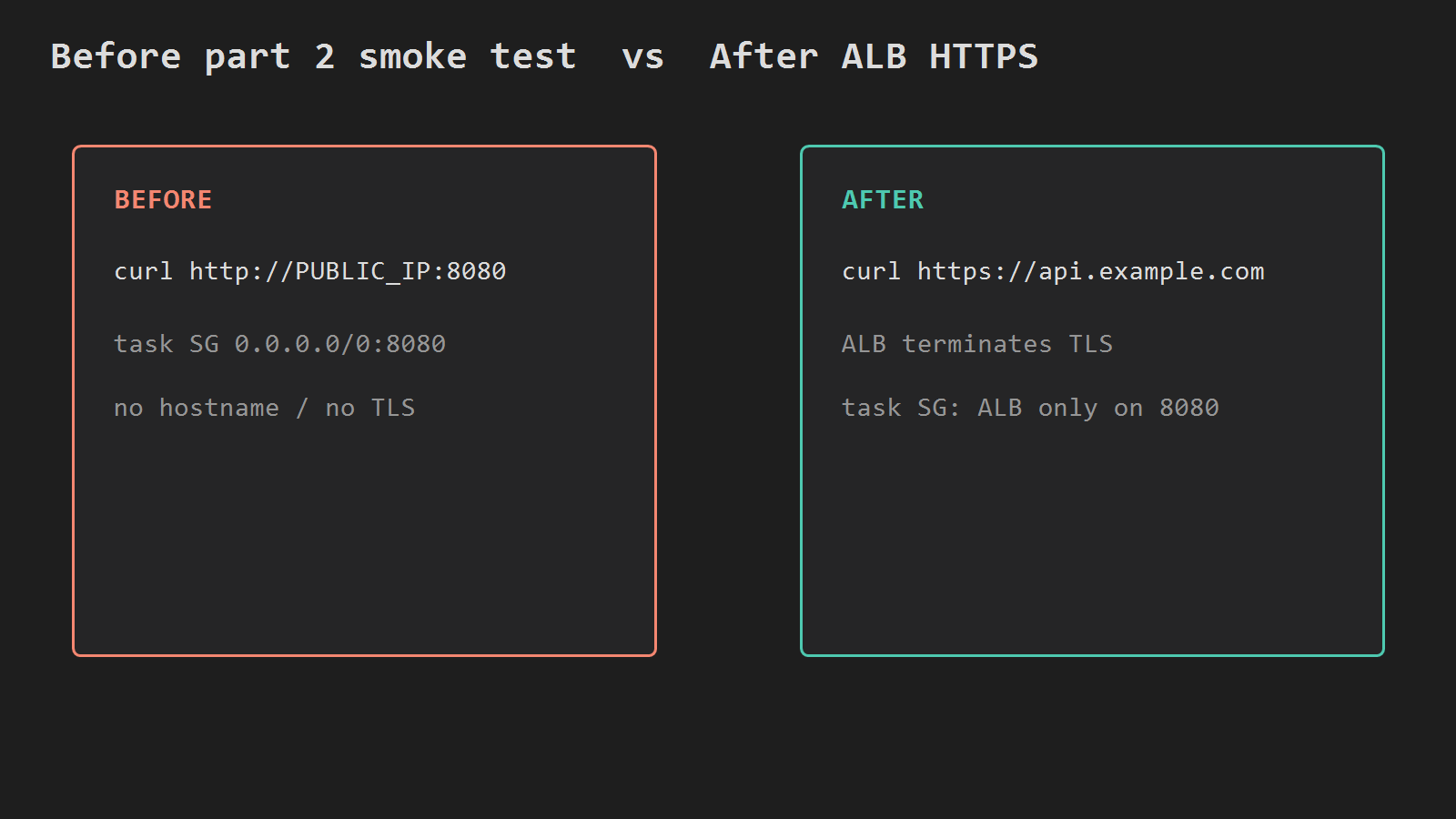
You already run Spring Boot on ECS Fargate and can curl the task public IP on port 8080. That is fine for a smoke test. It is not how you put the API on a domain with HTTPS, and leaving 8080 open to the internet is a bad default once real traffic starts.
Part 3 of 4 (ECR -> Fargate -> ALB HTTPS -> Actions). This post ends when https://api.example.com/actuator/health (or /) works through an Application Load Balancer, and the task security group allows 8080 only from the ALB.
It continues from Push a Spring Boot Docker Image to Amazon ECR and Run Spring Boot on ECS Fargate. The one-box path still ends TLS on the host (Nginx + Spring, Actions to EC2, health gate). Here TLS ends on the ALB — not on Nginx on an instance.
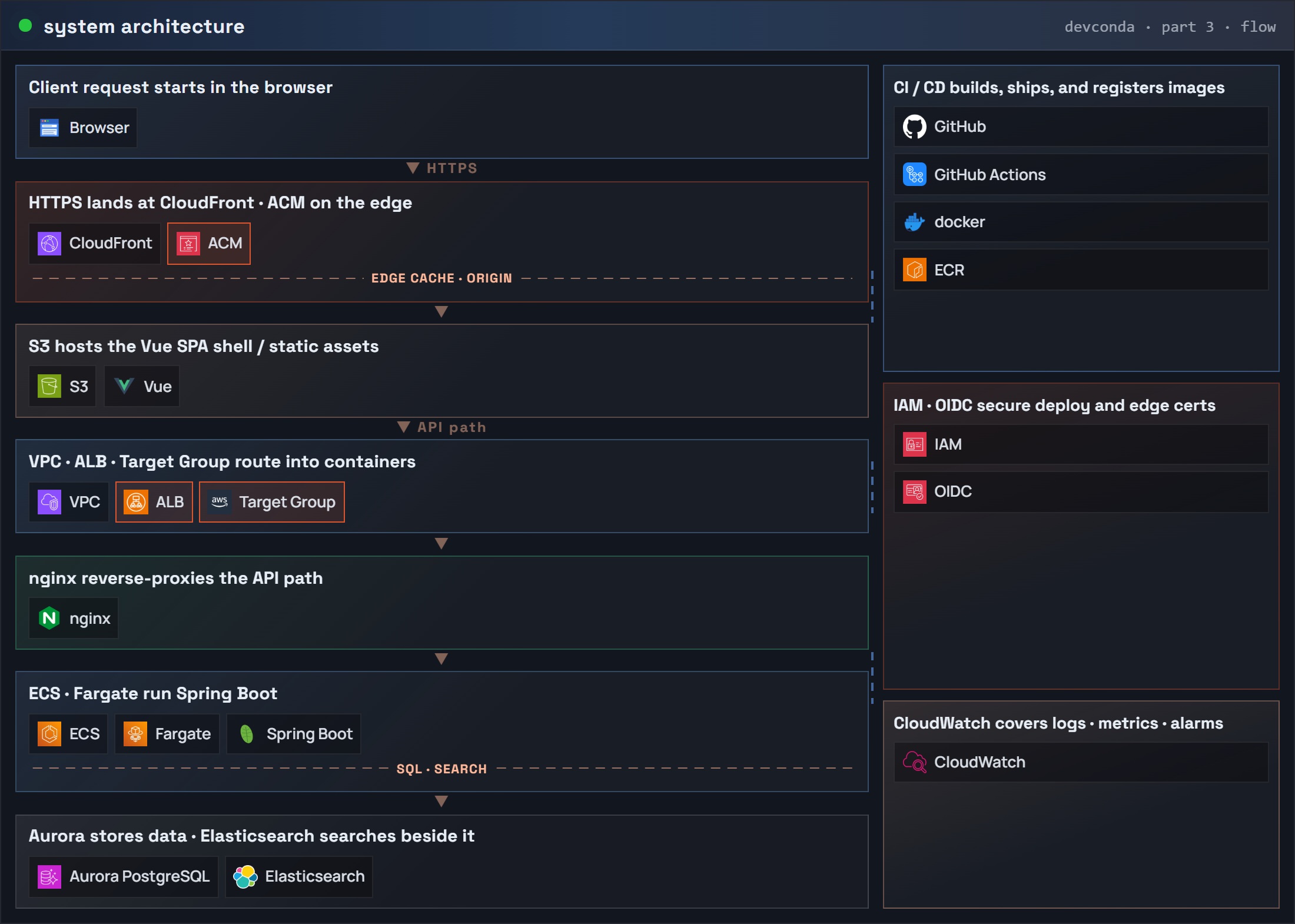
What you are building
Client
  -> ALB :443 (ACM cert)
      -> target group (type ip, port 8080)
          -> Fargate task :8080
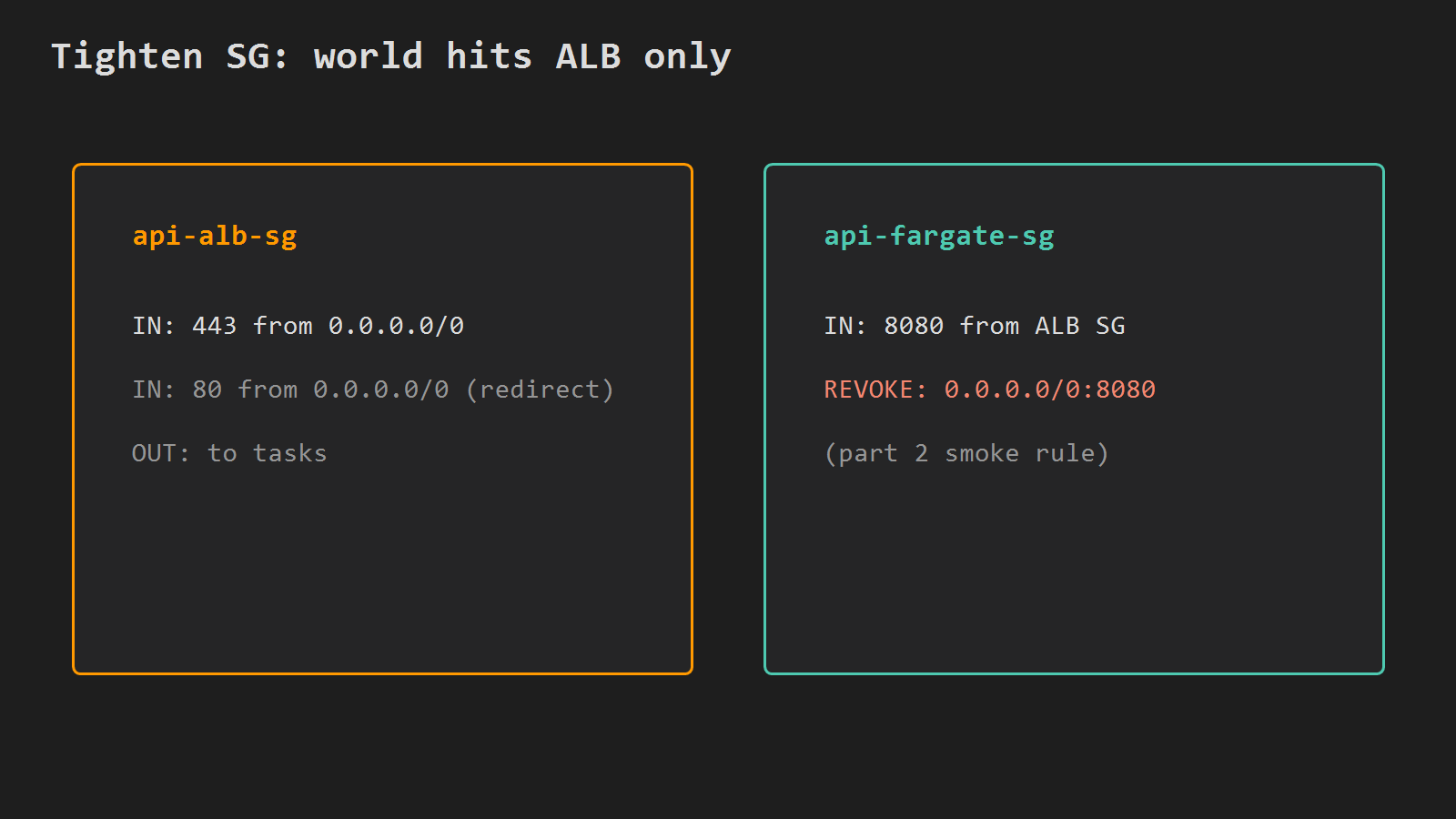
SG: ALB allows 443 from 0.0.0.0/0
    task allows 8080 only from ALB SG
Same account and region as parts 1–2 (ap-northeast-2 in examples). Reuse cluster api, service api, and image tag 1.0.0. Replace api.example.com with your hostname.
Part 3: system architecture (request flow) – ALB / Target Group / ACM
Before: curl the task public IP on :8080. After: curl the hostname on :443.
Before you start
You need:
- A hostname you control (example
api.example.com) and DNS that can point at the ALB (Route 53 or any DNS that supports CNAME/alias). - The part 2 service still running (or recreatable) in the same VPC. Part 2 could use one subnet for the Fargate task — that still works. Only the ALB needs two subnets in different Availability Zones (AWS rule for Application Load Balancers).
- Shell variables from part 2, or set them again:
# STS (Security Token Service): read the current AWS account ID
ACCOUNT=$(aws sts get-caller-identity --query Account --output text)
REGION=ap-northeast-2
CLUSTER=api
DOMAIN=api.example.com

# Find the default VPC (same path as part 2)
VPC_ID=$(aws ec2 describe-vpcs \
  --filters Name=isDefault,Values=true \
  --query 'Vpcs[0].VpcId' --output text --region $REGION)

# List subnet IDs by AZ — pick two different AZs for the ALB only
aws ec2 describe-subnets \
  --filters Name=vpc-id,Values=$VPC_ID \
  --query 'Subnets[].{id:SubnetId,az:AvailabilityZone}' \
  --output table --region $REGION
Pick two subnet IDs in different AZs for the load balancer (the Fargate service can keep the single subnet from part 2):
SUBNET_A=subnet-aaaaaaaa
SUBNET_B=subnet-bbbbbbbb
If you only have one AZ in the VPC, create a second public subnet before continuing — create-load-balancer will reject a single-AZ set. You do not need to move the ECS service into both subnets for this part.
ACM certificate
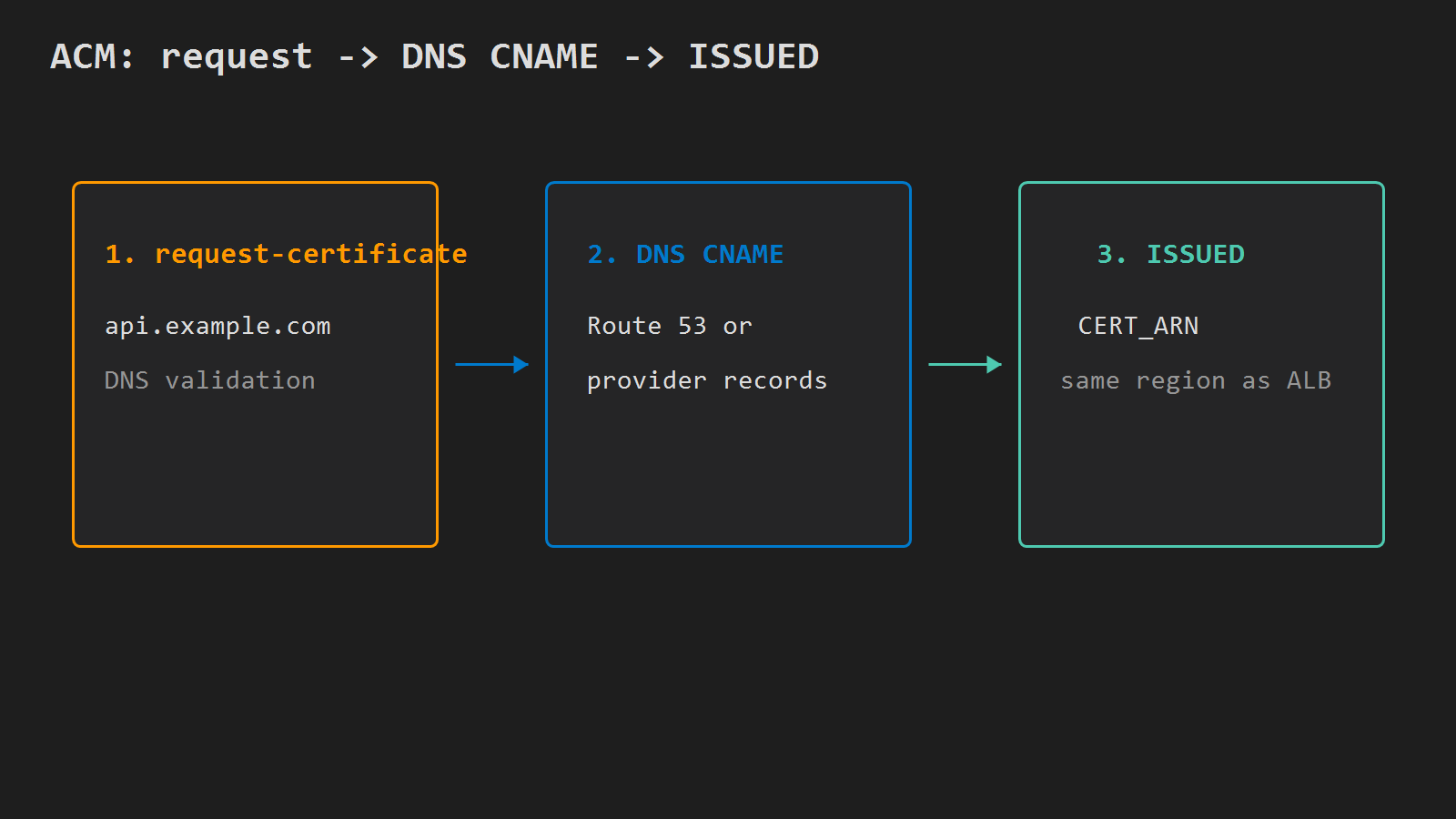
Request a public certificate in the same region as the ALB (regional ALB cannot use us-east-1-only CloudFront certs unless that is where the ALB lives):
# Request an ACM public cert for $DOMAIN (DNS validation)
CERT_ARN=$(aws acm request-certificate \
  --domain-name $DOMAIN \
  --validation-method DNS \
  --region $REGION \
  --query CertificateArn --output text)

echo $CERT_ARN
Add the DNS validation CNAME ACM prints (console Certificate manager → your cert → Create records in Route 53, or copy the CNAME to your DNS). Wait until the cert is ISSUED:
# Block until ACM marks the certificate ISSUED
aws acm wait certificate-validated --certificate-arn $CERT_ARN --region $REGION
Pending validation for a long time usually means the CNAME is missing, wrong, or cached at the DNS provider — not an ALB problem yet.
Target group and health check
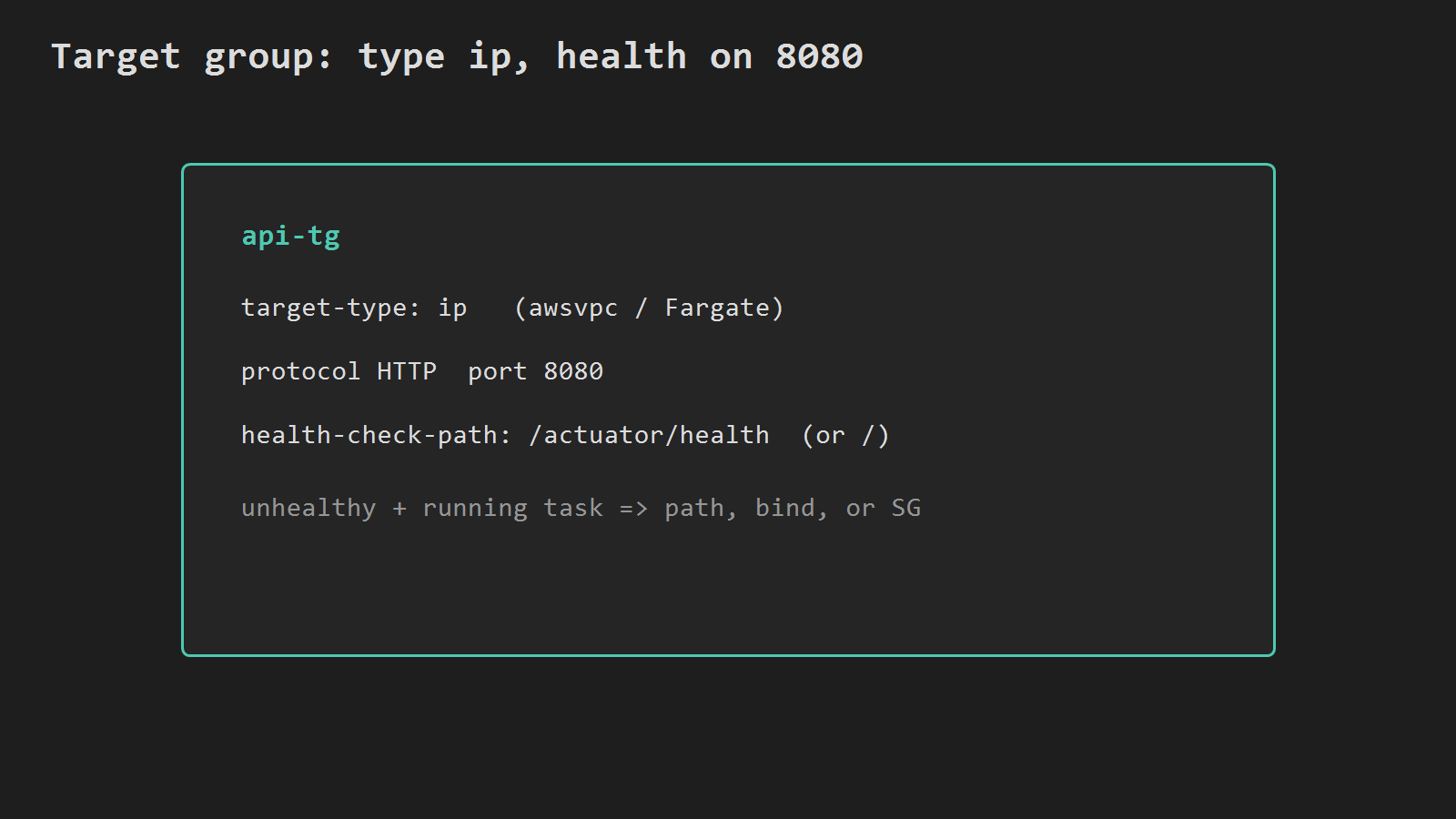
Fargate uses awsvpc, so the target type must be ip (instance type is for EC2 launch type):
# Create an IP target group for container port 8080
TG_ARN=$(aws elbv2 create-target-group \
  --name api-tg \
  --protocol HTTP \
  --port 8080 \
  --vpc-id $VPC_ID \
  --target-type ip \
  --health-check-protocol HTTP \
  --health-check-path /actuator/health \
  --health-check-interval-seconds 30 \
  --healthy-threshold-count 2 \
  --unhealthy-threshold-count 3 \
  --region $REGION \
  --query 'TargetGroups[0].TargetGroupArn' --output text)

echo $TG_ARN
If Actuator is not enabled, set --health-check-path / (or any path that returns 200). A target stuck unhealthy with a running task usually means wrong path, app not listening on 8080, or security group blocking the ALB.
ALB, listeners, and security groups
Create a security group for the load balancer and one rule set for the tasks:
# Security group for the ALB (public HTTPS)
ALB_SG=$(aws ec2 create-security-group \
  --group-name api-alb-sg \
  --description "ALB for api" \
  --vpc-id $VPC_ID \
  --region $REGION \
  --query GroupId --output text)

# Allow inbound HTTPS from the internet
aws ec2 authorize-security-group-ingress \
  --group-id $ALB_SG \
  --protocol tcp --port 443 --cidr 0.0.0.0/0 \
  --region $REGION

# Optional: HTTP 80 so you can redirect to HTTPS
aws ec2 authorize-security-group-ingress \
  --group-id $ALB_SG \
  --protocol tcp --port 80 --cidr 0.0.0.0/0 \
  --region $REGION
Reuse or look up the part 2 task security group (api-fargate-sg):
# Find the Fargate task security group from part 2
TASK_SG=$(aws ec2 describe-security-groups \
  --filters Name=group-name,Values=api-fargate-sg Name=vpc-id,Values=$VPC_ID \
  --query 'SecurityGroups[0].GroupId' --output text --region $REGION)

# Allow 8080 only from the ALB security group
aws ec2 authorize-security-group-ingress \
  --group-id $TASK_SG \
  --protocol tcp --port 8080 \
  --source-group $ALB_SG \
  --region $REGION
Remove the temporary world-open 8080 rule from part 2 (adjust the rule id if yours differs):
# Revoke 0.0.0.0/0:8080 left over from the Fargate smoke test
aws ec2 revoke-security-group-ingress \
  --group-id $TASK_SG \
  --protocol tcp --port 8080 --cidr 0.0.0.0/0 \
  --region $REGION
Create the ALB across both subnets:
# Create an internet-facing Application Load Balancer
ALB_ARN=$(aws elbv2 create-load-balancer \
  --name api-alb \
  --type application \
  --scheme internet-facing \
  --subnets $SUBNET_A $SUBNET_B \
  --security-groups $ALB_SG \
  --region $REGION \
  --query 'LoadBalancers[0].LoadBalancerArn' --output text)

# Read the ALB DNS name for Route 53 / CNAME
ALB_DNS=$(aws elbv2 describe-load-balancers \
  --load-balancer-arns $ALB_ARN \
  --query 'LoadBalancers[0].DNSName' --output text --region $REGION)

echo $ALB_DNS
HTTPS listener (and optional HTTP → HTTPS redirect):
# HTTPS :443 -> forward to target group (ACM cert)
aws elbv2 create-listener \
  --load-balancer-arn $ALB_ARN \
  --protocol HTTPS --port 443 \
  --certificates CertificateArn=$CERT_ARN \
  --default-actions Type=forward,TargetGroupArn=$TG_ARN \
  --region $REGION

# HTTP :80 -> 301 redirect to HTTPS
aws elbv2 create-listener \
  --load-balancer-arn $ALB_ARN \
  --protocol HTTP --port 80 \
  --default-actions "Type=redirect,RedirectConfig={Protocol=HTTPS,Port=443,StatusCode=HTTP_301}" \
  --region $REGION
Point DNS at the ALB: Route 53 alias to the load balancer, or a CNAME from api.example.com to $ALB_DNS.
Attach the ECS service
Register the service with the target group. Container name must match the task definition (api):
# Attach service api to the IP target group on container port 8080
aws ecs update-service \
  --cluster $CLUSTER \
  --service api \
  --load-balancers "targetGroupArn=$TG_ARN,containerName=api,containerPort=8080" \
  --region $REGION
If update-service rejects load balancer changes on an old service, delete and recreate the service with the same task definition plus --load-balancers and the same network config as part 2 (assignPublicIp=ENABLED is still fine in a public subnet for ECR pulls; inbound 8080 is now ALB-only).
Wait for stability and healthy targets:
# Wait until ECS reports the service stable
aws ecs wait services-stable --cluster $CLUSTER --services api --region $REGION

# Show target health (should become healthy)
aws elbv2 describe-target-health \
  --target-group-arn $TG_ARN \
  --region $REGION \
  --output table
TLS stops at the ALB; the task still speaks HTTP on 8080. If the app builds absolute URLs or issues redirects, set server.forward-headers-strategy=framework (Spring Boot 2.2+) so it trusts X-Forwarded-* from the load balancer. Actuator health checks do not need that.
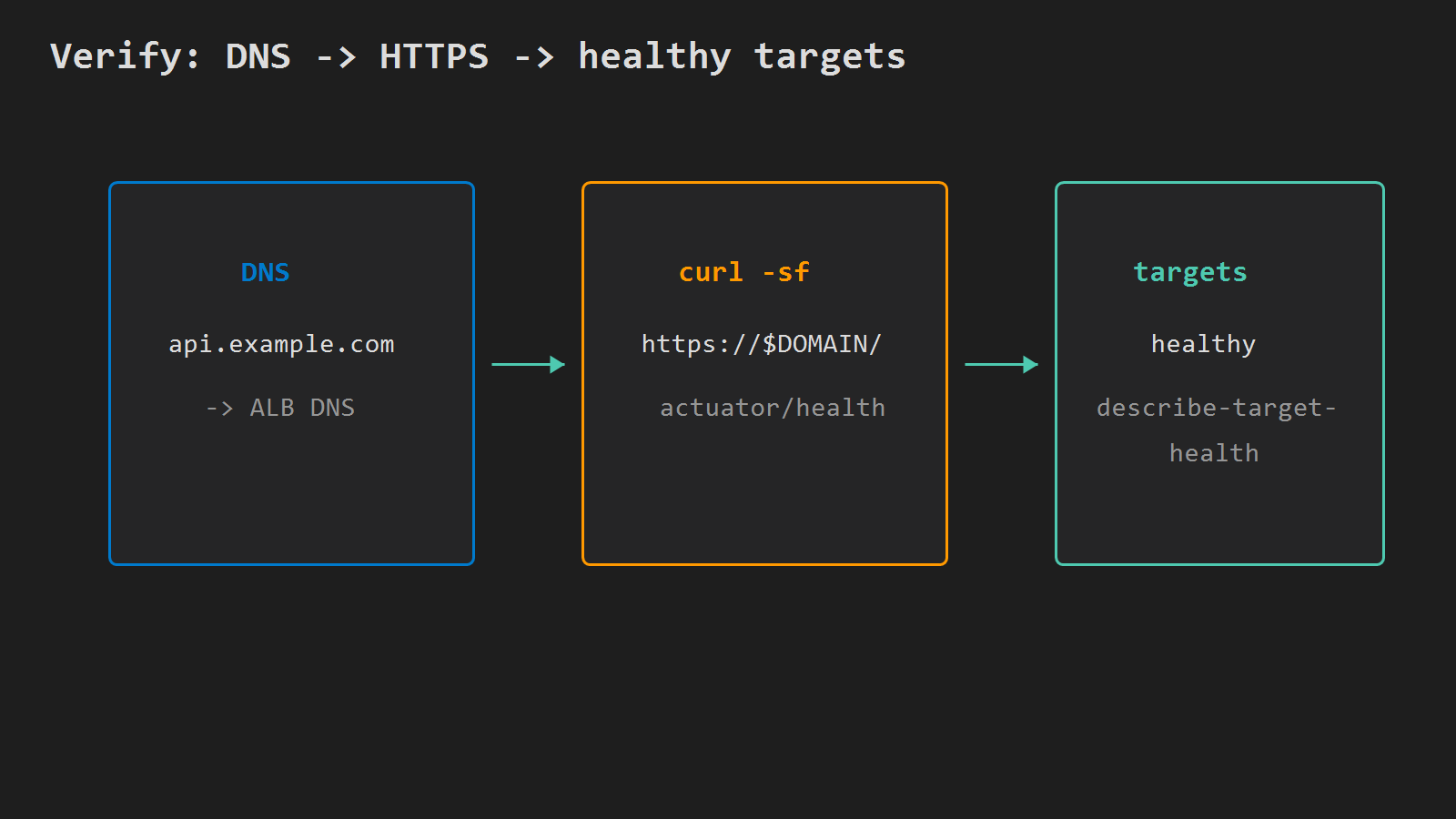
Verify
# HTTPS health through the hostname (ACM + ALB + target)
curl -sf "https://$DOMAIN/actuator/health" || curl -sf "https://$DOMAIN/"

# Direct task public IP :8080 should fail or time out after SG revoke
Certificate name mismatch means DNS still points elsewhere or you curled the raw ALB DNS with a cert issued only for $DOMAIN. 502 / 503 with unhealthy targets → health path, SG, or Spring not listening. CloudWatch /ecs/api still holds container logs.
Next in series
Part 4 wires GitHub Actions to build the jar, push a new ECR tag, register a task revision, and force a new deployment on this service behind the ALB. Planned slug: deploy-spring-boot-to-fargate-from-github-actions.
Minimal checklist
- ACM certificate for
$DOMAINisISSUEDin the ALB region. - Target group
api-tgis typeip, port8080, health path returns 200. - ALB has HTTPS
:443(and optional HTTP redirect); DNS points at the ALB. - Task SG allows
8080from ALB SG only — not0.0.0.0/0. curl https://$DOMAIN/actuator/health(or/) succeeds; targets show healthy.
After that, public traffic hits HTTPS on the ALB; Fargate still runs the same ECR image from parts 1–2.




Leave a Reply