Symptom
After connecting an Oracle session, querying a DBLink table took about 25 seconds before returning results. After the first query, it worked normally.
Root cause
When Oracle resolves a DBLink DNS name, it first checks /etc/hosts, then /etc/resolv.conf. Neither responded, so a 25-second timeout occurred, after which a local lookup created the session.
In tnsnames.ora (/oracle/product/19.3.0/dbhome_1/network/admin/tnsnames.ora), HOST was set to a hostname instead of an IP:
TESTSMS =
  (DESCRIPTION =
    (ADDRESS = (PROTOCOL = TCP)(HOST = testdb)(PORT = 1521))
    (CONNECT_DATA =
      (SERVER = DEDICATED)
      (SERVICE_NAME = testsms)
    )
  )
hosts
File used to map domains to IPs without DNS: /etc/hosts
127.0.0.1   localhost localhost.localdomain localhost4 localhost4.localdomain4
::1         localhost localhost.localdomain localhost6 localhost6.localdomain6
resolv.conf
Name-server settings file: /etc/resolv.conf
# Generated by NetworkManager
nameserver 164.124.109.142
nameserver 203.248.252.2
resolv.h
/usr/include/resolv.h
# define RES_TIMEOUT      5       /* min. seconds between retries */
# define RES_DFLRETRY     2       /* Default #/tries. */
dig.h
Normal DNS queries use UDP:
/*% Default UDP Timeout */
#define UDP_TIMEOUT 5- 1st try, nameserver 1: timeout 5 sec (
UDP_TIMEOUT) - 1st try, nameserver 2: timeout 5 sec (
UDP_TIMEOUT) - Wait after 1st failure: 5 sec (
RES_TIMEOUT) - 2nd try, nameserver 1: timeout 5 sec (
UDP_TIMEOUT) - 2nd try, nameserver 2: timeout 5 sec (
UDP_TIMEOUT)
Total about 25 seconds, then a local lookup.
Fix
Skip DNS and fall through to local lookup by renaming resolv.conf:
mv /etc/resolv.conf /etc/resolv.bak.conf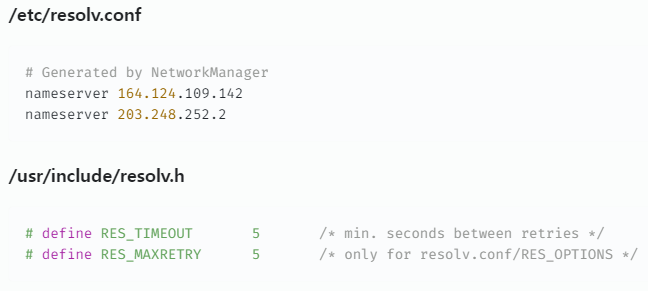
Leave a Reply