While building a side project, I needed an Excel download feature, so I documented the approach.
There are two approaches: generating the Excel file entirely in Vue from data shown on the screen, and generating it on a Spring Boot server then downloading the result in Vue.
Generate in Vue
This downloads a registered charger list as Excel. The data already rendered on the screen is turned into an Excel file and downloaded in the browser.
Because Vue handles the file, import the xlsx library:
import * as Xlsx from 'xlsx';1. Vue declaration
Declare a variable to hold the Excel rows:
data(){
  return{
    excelData:[]
  }
},
When the screen loads, fill excelData from the fetched tableData.
workBook is the Excel file, workSheet is a sheet inside it, and writeFile triggers a browser download with the given filename.
makeExcelFile (){
  for(var i=0; i<this.tableData.length;i++){
    this.excelData.push({
      idx: this.tableData[i].idx,
      chargerCompany: this.tableData[i].chargerCompany,
      station_id: this.tableData[i].station_id,
      addr: this.tableData[i].addr,
      detail_addr: this.tableData[i].detail_addr,
      latitude: this.tableData[i].latitude,
      longitude: this.tableData[i].longitude,
      create_dt: this.tableData[i].create_dt,
      modify_dt: this.tableData[i].modify_dt,
    });
  }
  const workBook = Xlsx.utils.book_new();
  const workSheet = Xlsx.utils.json_to_sheet(this.excelData);
  Xlsx.utils.book_append_sheet(workBook, workSheet, 'tableData');
  Xlsx.writeFile(workBook, 'filename.xlsx');
},
2. Vue call site
Excel download
Generate on the server
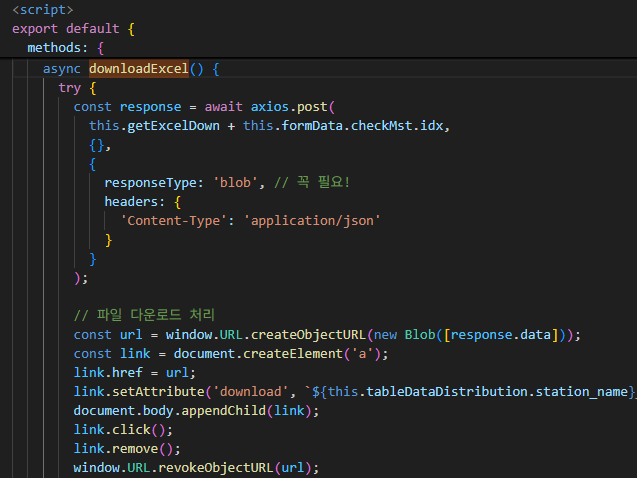
DB data is bound into an Excel file on the server and sent to Vue. Vue does not build the spreadsheet; it only turns the received bytes into a download link.
1. Vue declaration
async downloadExcel() {
  try {
    const response = await axios.post(
      this.getExcelDown + this.formData.checkMst.idx,
      {},
      {
        responseType: 'blob', // required
        headers: {
          'Content-Type': 'application/json'
        }
      }
    );

    // Trigger file download
    const url = window.URL.createObjectURL(new Blob([response.data]));
    const link = document.createElement('a');
    link.href = url;
    link.setAttribute('download', `filename.xlsx`);
    document.body.appendChild(link);
    link.click();
    link.remove();
    window.URL.revokeObjectURL(url);
  } catch (error) {
    console.error('Download failed:', error);
    alert('Failed to download the file.');
  }
}
2. Vue call site
Same as the Vue-only approach: Excel download
3. Spring Boot controller
Controller that receives the Vue request. Aside from the content type, it is straightforward:
@PostMapping("/excel/{idx}")
public ResponseEntity<byte[]> generateReport(@PathVariable int idx) {
  byte[] excelData;
  try {
    excelData = service.createInspectionForm(idx);
    return ResponseEntity.ok()
      .header("Content-Type", "application/vnd.openxmlformats-officedocument.spreadsheetml.sheet")
      .header("Content-Disposition", "attachment; filename=\"filename.xlsx\"")
      .body(excelData);
  } catch (IOException e) {
    e.printStackTrace();
    return null;
  }
}
4. Spring Boot service
Function that builds the Excel file. The layout is mostly static, so instead of drawing the sheet in code, keep an original template file, clone sheets from it, and fill in the data.
public byte[] createInspectionForm(int charger_station_idx) throws IOException {
  InputStream templateStream = null;
  File templateFile = null;
  XSSFWorkbook workbook = null;
  ByteArrayOutputStream outputStream = new ByteArrayOutputStream();
  try {
    templateFile = new File(templatePath + "ex.xlsx"); // original template
    if (templateFile.exists() && templateFile.isFile()) {
      templateStream = new FileInputStream(templateFile); // load into stream
    }
    workbook = new XSSFWorkbook(templateStream); // create workbook
    XSSFSheet templateSheet = workbook.getSheetAt(0); // first sheet as template
    XSSFSheet sheetFrm;
    for (int i = 0; i < listVariable.size(); i++) {
      // first item reuses the original sheet; otherwise clone
      if (i == 0) {
        sheetFrm = templateSheet;
        workbook.setSheetName(i, "sheetName(unique)");
      } else {
        sheetFrm = workbook.cloneSheet(0);
        workbook.setSheetName(i + 1, "sheetName(unique)");
      }
      XSSFSheet sheet = workbook.getSheet("sheetName(unique)");
      Row row = sheet.getRow(6); // row
      row.getCell(4).setCellValue(check.getTemperature()); // write cell
      Row row = sheet.getRow(7); // row
      row.getCell(4).setCellValue(check.getTemperature()); // write cell
      Row row = sheet.getRow(8); // row
      row.getCell(4).setCellValue(check.getTemperature()); // write cell
    }
    workbook.write(outputStream); // write workbook
    workbook.close();
    return outputStream.toByteArray();
  } finally {
    if (templateStream != null) {
      try {
        templateStream.close();
      } catch (IOException e) {
        // ignore close failures
      }
    }
    if (workbook != null) {
      try {
        workbook.close();
      } catch (IOException e) {
        // ignore close failures
      }
    }
  }
}
The server sends a byte array, and Vue receives it as a blob and downloads it.
The server service implementation was the harder part.
Leave a Reply