This post focuses on the concept: what a message broker is, how it fits microservices (MSA), and when to use it instead of HTTP. Spring Boot snippets are short – enough to see how producers and consumers attach.
When you split a monolith into services – orders, payments, inventory, notifications – and call everything with REST, a few problems show up:
- If the notification service is briefly down, the order API can look like it failed too.
- Slow work (sending email) makes users wait on the "Place order" button.
- Many services need to know "an order happened," so the order service must know every URL.
A message broker like RabbitMQ is a different tool from "call them on the phone now" (HTTP). It is closer to leaving a note or a parcel for later.
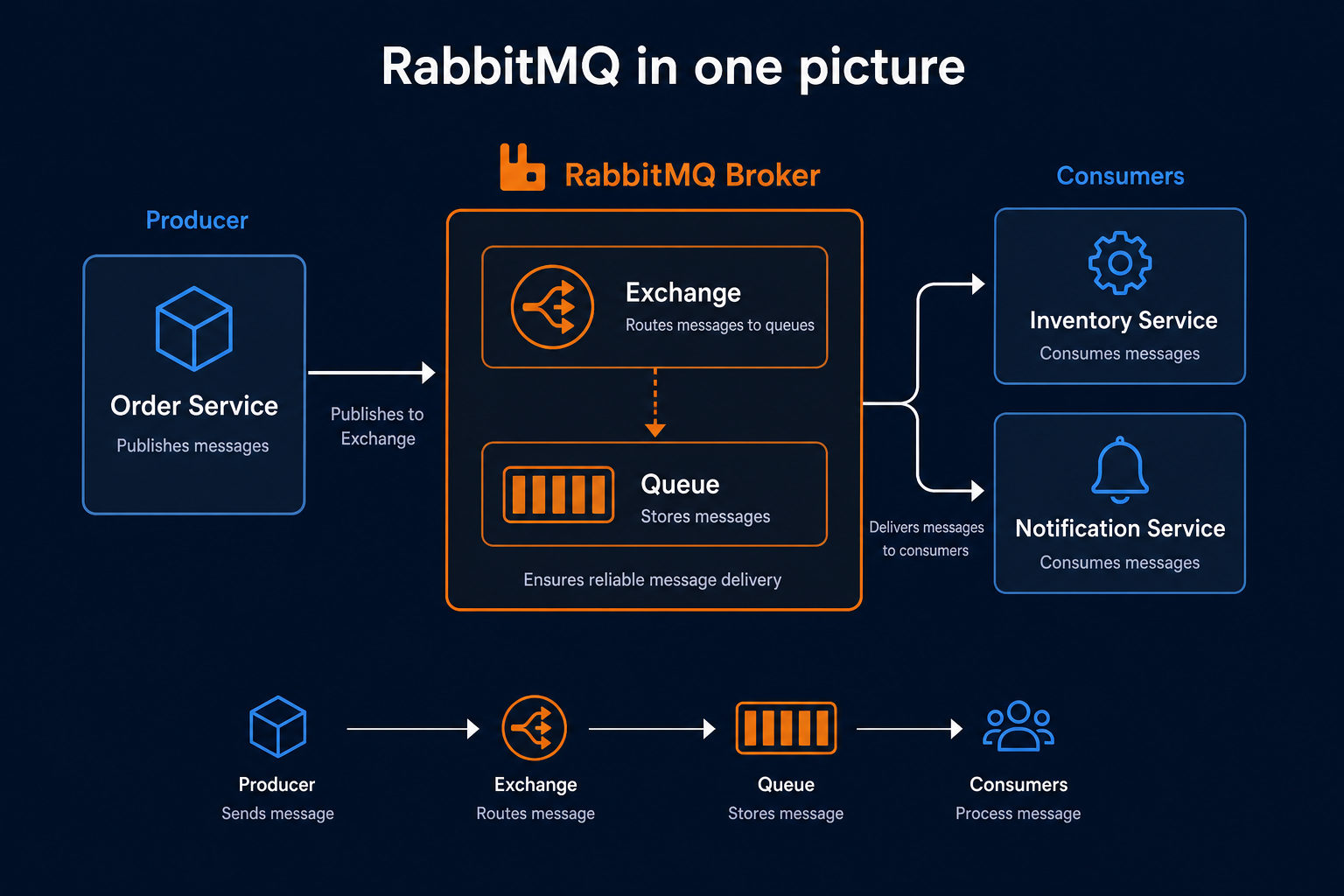
RabbitMQ in one picture
| Role | Job | Analogy |
|---|---|---|
| Producer | Sends a message | Person dropping a "please do this" note |
| Exchange | Decides which queues get it | Post office sorter |
| Queue | Holds messages until work starts | Parcel locker |
| Consumer | Takes messages and processes them | Worker who opens the parcel |
Order service (Producer) -> Exchange -> Queue -> Inventory / Notification (Consumers)Consumers subscribe to RabbitMQ and pull messages as they arrive.
How is this different from HTTP?
| HTTP (REST) | RabbitMQ | |
|---|---|---|
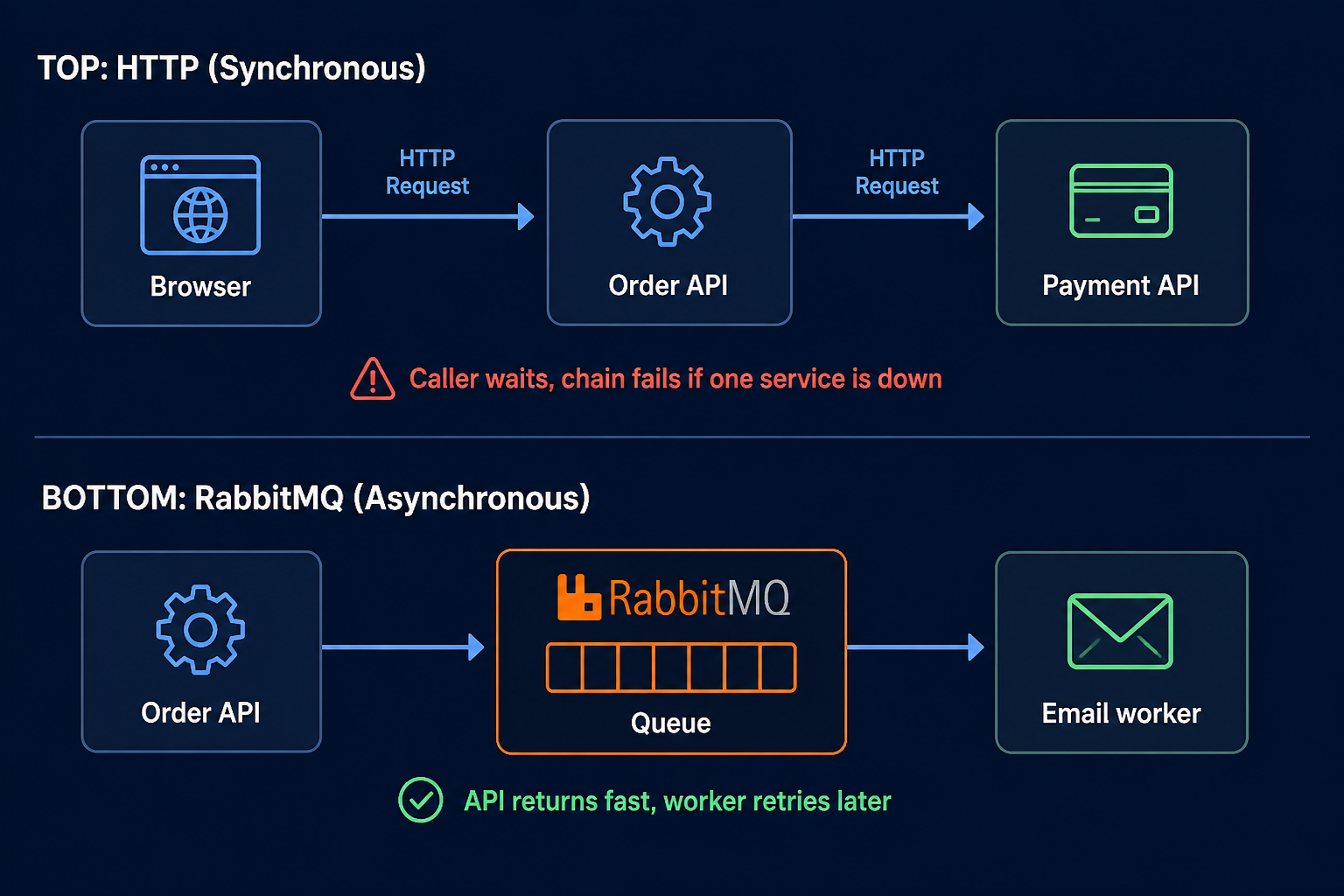
| Timing | Sync – wait for the other side | Async – put it on a queue; work happens later |
| Coupling | Caller must know the other service URL | Caller only needs the event or queue name |
| Failure | Peer down -> immediate error | Messages sit in the queue until consumers recover |
| Good fit | Reads, "is this payment approved now?" | Email, push, search sync, audit logs |
You use both. All-MQ or all-REST is rare. In practice: HTTP when you need an answer now, MQ when the work can wait.
Two patterns in MSA
1) Task queue – "Do this job." Several consumers compete for one queue (thumbnails, PDF, email send).
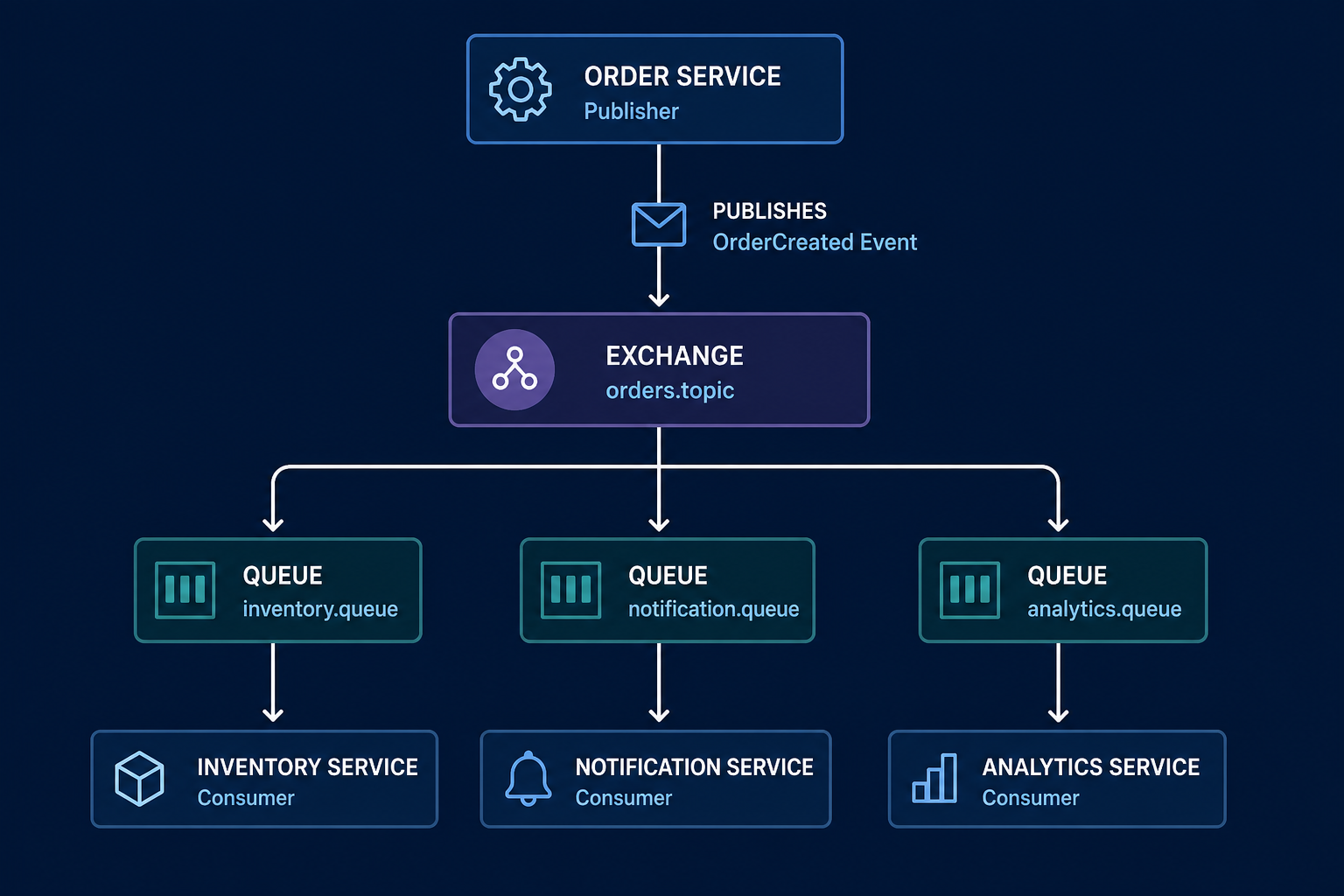
2) Events (pub/sub) – "This happened." One publish, many services each get their own queue (OrderCreated -> stock, notify, analytics).
The order walkthrough below is pattern 2. For pattern 1, remember: workers share one queue and divide the work.
Order example
- User hits the order API -> order saved in the DB.
- Order service publishes to RabbitMQ:
{
  "event": "OrderCreated",
  "orderId": "ord-123",
  "userId": "u1",
  "amount": 9900
}- Inventory service – consumes its queue and decreases stock.
- Notification service – consumes its queue and sends "order received" email/push.
- Analytics / logging (optional) – same event, separate queue.
- The order API returns 201 after step 2 – the user does not wait for email to finish.
The order service does not need inventory or notification URLs. It needs the exchange name and message shape. That is loose coupling in MSA.
Exchange types (names to know)
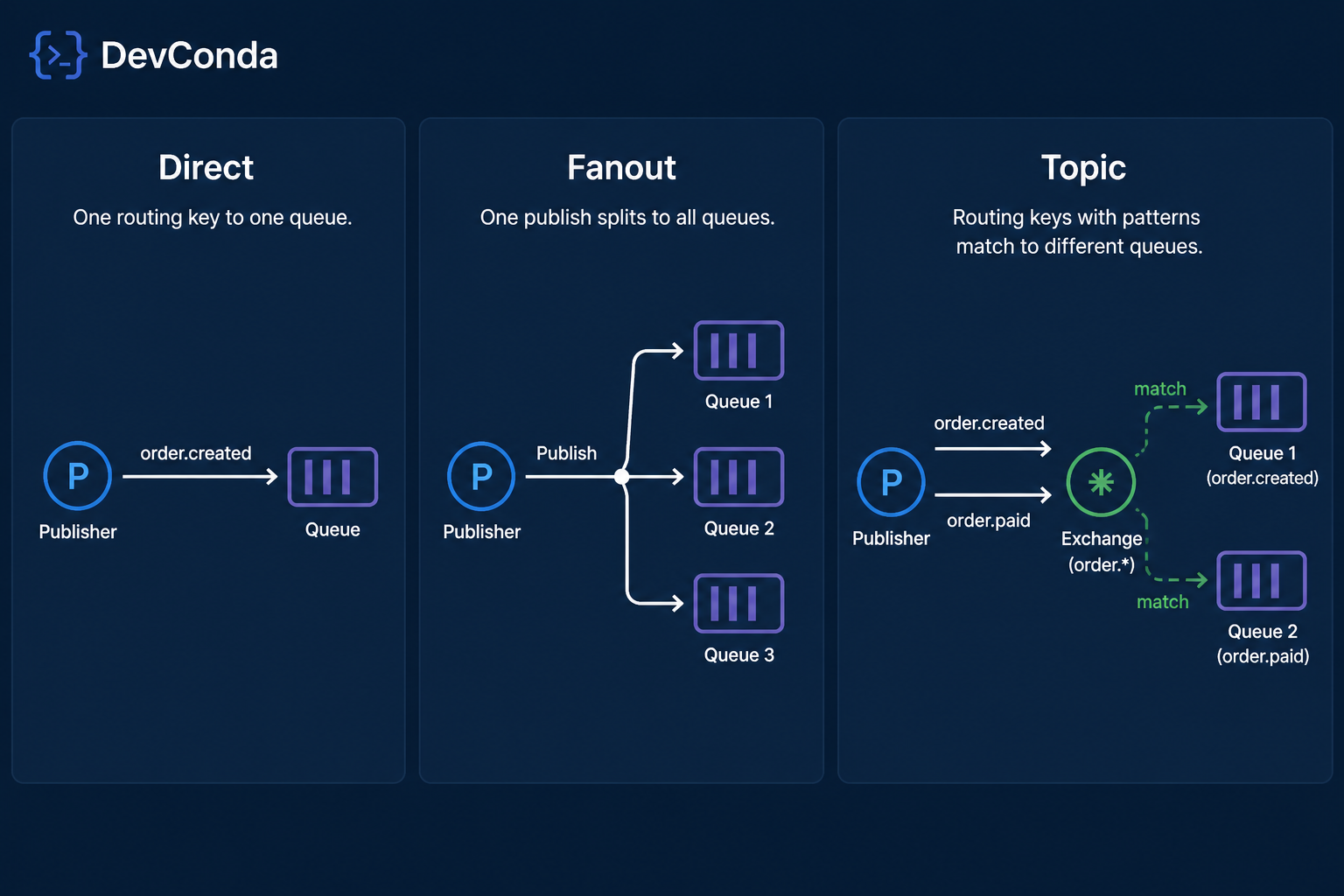
| Type | One line | Example |
|---|---|---|
| Direct | Exact routing key match | order.created -> one post-order queue |
| Fanout | Copy to every bound queue | UserRegistered -> email, points, logs |
| Topic | Patterns like order.* |
Domain event hub |
Event hubs often use Topic or Fanout. Simple job queues often use Direct plus a dedicated queue.
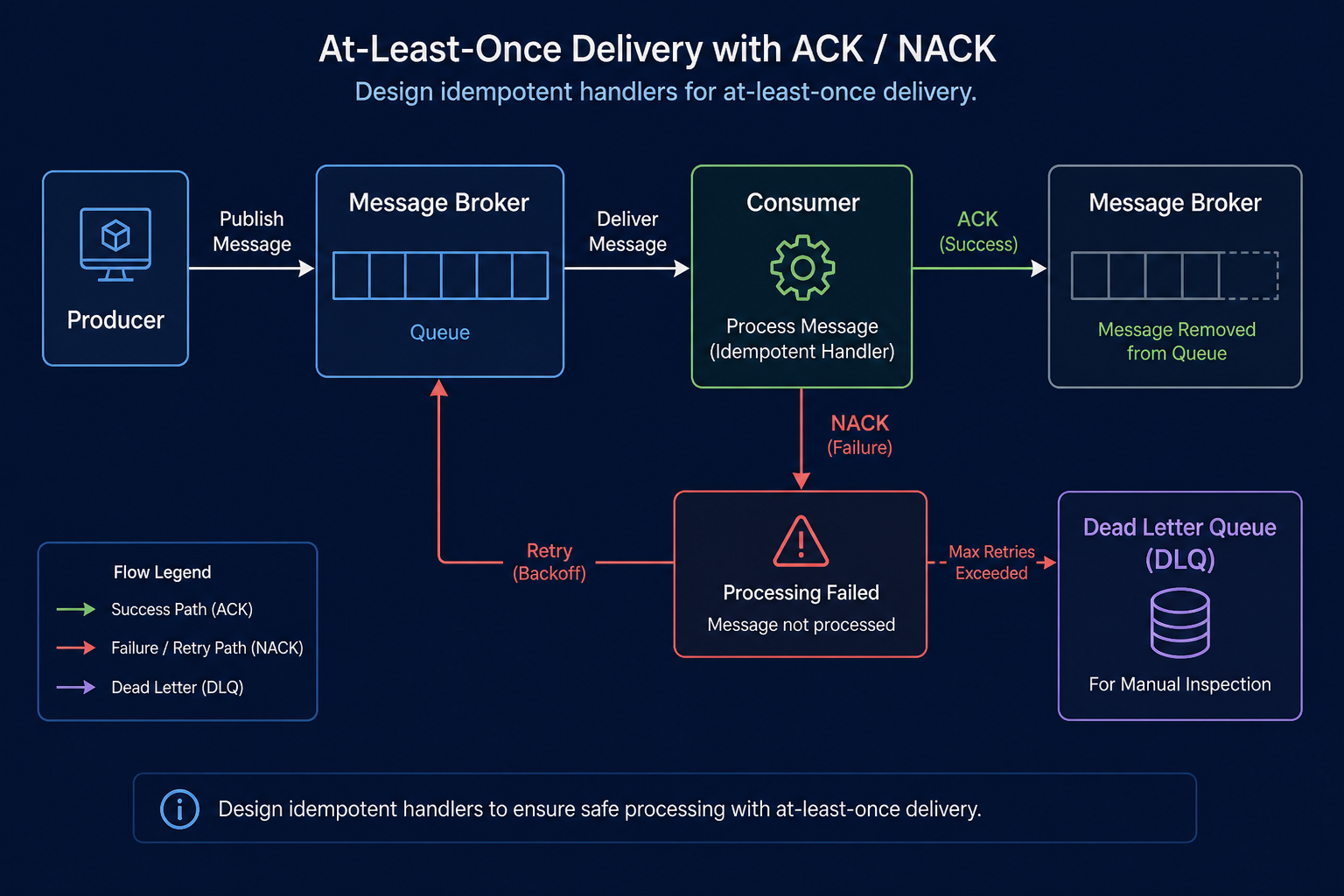
Ack, DLQ, and idempotency
- Ack (acknowledge) – consumer tells the broker "done"; then the message leaves the queue.
- At-least-once – the same message may arrive twice after retries -> design for idempotency (same
orderIdapplied once). - DLQ (Dead Letter Queue) – messages that fail repeatedly are isolated for manual review.
- Prefetch – how many messages a consumer takes at once (avoid overloading one worker).
How it looks in Spring Boot
Producer:
rabbitTemplate.convertAndSend("orders.topic", "order.created", event);Consumer:
@RabbitListener(queues = "inventory.order-created")
public void onOrderCreated(OrderCreatedEvent event) {
    inventoryService.decrease(event.orderId());
}
Local RabbitMQ is often one Docker command:
docker run -d --name rabbitmq -p 5672:5672 -p 15672:15672 rabbitmq:3-management5672– AMQP for apps15672– management UI (inspect queues in the browser)
RabbitMQ vs Kafka (one line)
| RabbitMQ | Kafka | |
|---|---|---|
| Role | Business messages and job queues | Event streams / logs |
| Messages | Usually removed after ack | Kept on topics; can replay |
| Fit | Notify, post-order work, mid-size MSA | High volume, analytics, replay |
For many teams starting with "after order: notify + inventory," RabbitMQ is a common first choice.
When RabbitMQ is a good fit
- Return the API response fast; do heavy work in the background.
- Several services must each react to the same event.
- You want more throughput by adding consumer instances.
- A peer can be briefly down and work can finish later.
If you need an answer right now (payment approval), use HTTP or gRPC.
Out of scope here
- RabbitMQ cluster HA and quorum queues
- Full Saga / compensation design
- Migrating to Kafka
A natural follow-up post: Spring Boot + RabbitMQ with local Docker, end to end.




Leave a Reply