While working on a project with MySQL on an NCP server, the app could not connect to MySQL when I ran it locally. I found that an SSH tunnel is required for local connections, so I set that up and wrote it down here.
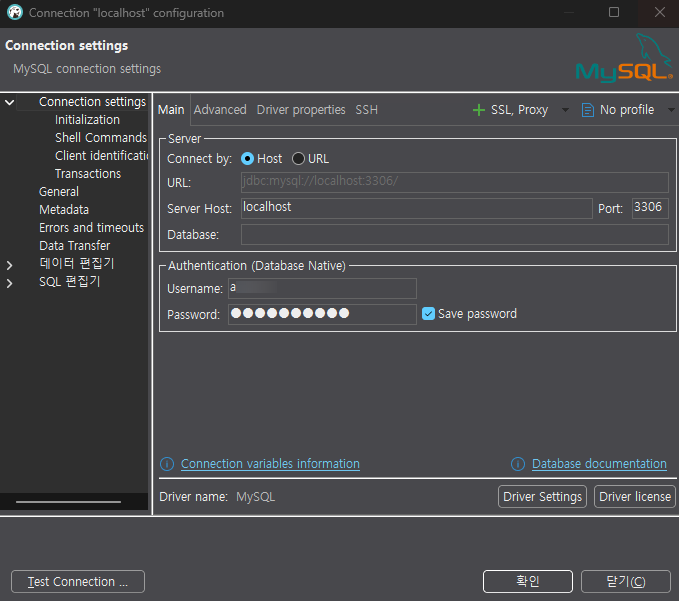
First I tested from local with DBeaver. On the Main tab, set the host to localhost and use the account you configured when installing MySQL.
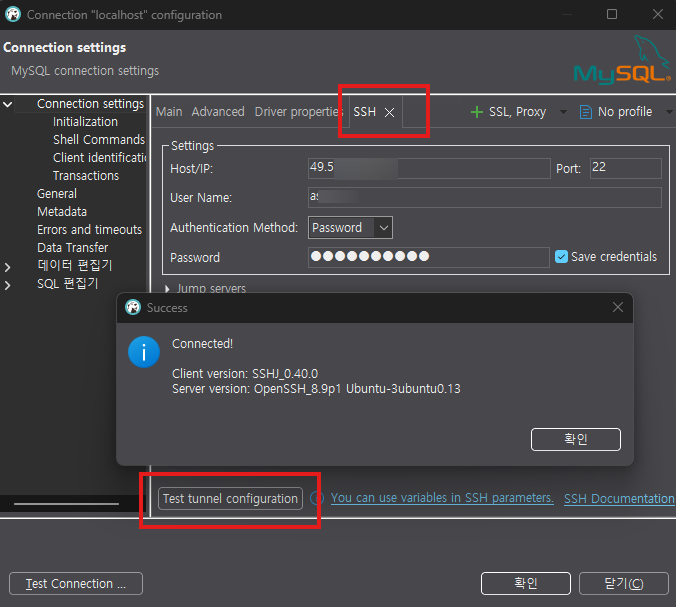
On the SSH tab, enter the NCP IP and account details, then run the tunnel test in the middle of the screen until it succeeds.
In this project the DB and WAS run on the same physical server, so production connects directly. The tunnel is only used when running locally.
Rename application.yml to application-prd.yml.
application-prd.yml
server:
  port: 8080

spring:
  jmx:
    enabled: false
  # Application
  application:
    name: SCSystem
  # DB connection
  datasource:
    driver-class-name: com.mysql.cj.jdbc.Driver
    url: jdbc:mysql://localhost:3306/DB_NAME
    username: username
    password: password
  servlet:
    multipart:
      max-file-size: 20MB
      max-request-size: 20MB

# MyBatis
mybatis:
  config-location: classpath:mybatis-config.xml
  mapper-locations: classpath:mapper/*.xml
  type-aliases-package: com.SCSystem

logging:
  level:
    root: info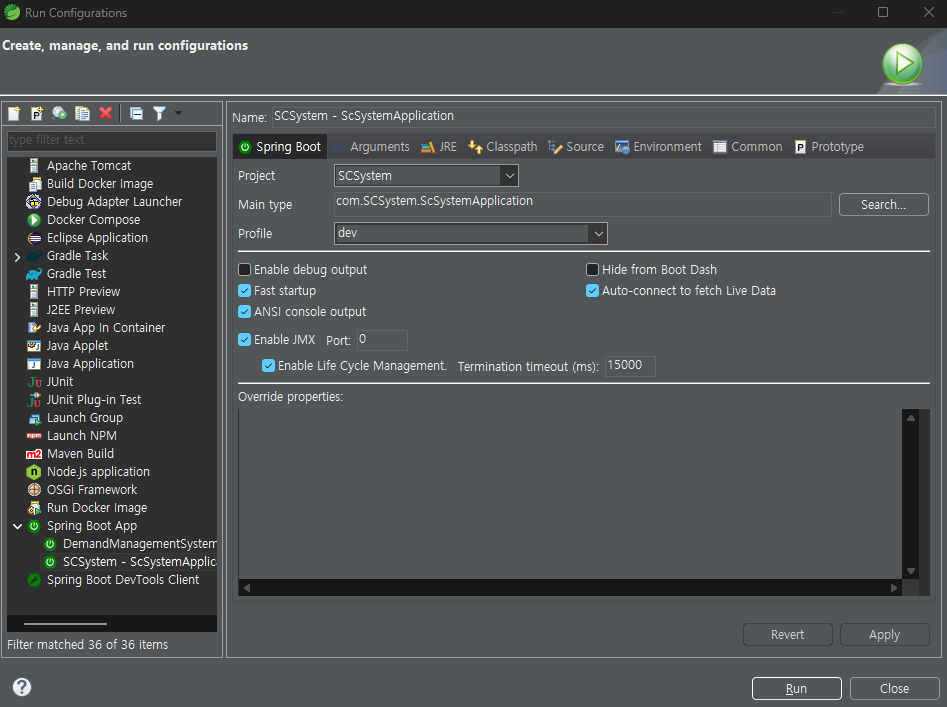
Create application-dev.yml with the SSH settings added.
application-dev.yml
server:
  port: 8080

# Enable SSH tunnel
ssh:
  enabled: true
  host: NCP_IP
  sshPort: 22
  username: username
  password: password
  localPort: 3306
  remoteHost: localhost  # when remote MySQL is on the same machine as the SSH server
  remotePort: 3306

#java -jar .\SCSystem-SNAPSHOT.jar --spring.profiles.active=dev
spring:
  jmx:
    enabled: false
  # Application
  application:
    name: SCSystem
  # DB connection
  datasource:
    driver-class-name: com.mysql.cj.jdbc.Driver
    url: jdbc:mysql://localhost:3306/as_evse
    username: username
    password: password

# MyBatis
mybatis:
  config-location: classpath:mybatis-config.xml
  mapper-locations: classpath:mapper/*.xml
  type-aliases-package: com.SCSystem

logging:
  level:
    root: info
SshTunnelConfig.java
Add @Configuration so the tunnel runs only when the dev profile is active.
package com.SCSystem.config;

import com.jcraft.jsch.*;

import lombok.Data;

import org.springframework.boot.context.properties.ConfigurationProperties;
import org.springframework.context.annotation.Bean;
import org.springframework.context.annotation.Configuration;
import org.springframework.context.annotation.Profile;
import javax.annotation.PreDestroy;

@Configuration
@ConfigurationProperties(prefix = "ssh")
@Profile("dev")  // active only in the development environment
@Data
public class SshTunnelConfig {

    // === properties (injected from application-dev.yml) ===
    private boolean enabled;
    private String host;
    private int sshPort;
    private String username;
    private String password;
    private int localPort;
    private String remoteHost;
    private int remotePort;
    private Session session;

    @Bean
    public void startTunnel() throws JSchException {
	        JSch jsch = new JSch();
	        session = jsch.getSession(username, host, sshPort);
	        session.setPassword(password);
	        session.setConfig("StrictHostKeyChecking", "no");
	        session.connect();
	        session.setPortForwardingL(localPort, remoteHost, remotePort);

	        if(session.isConnected())
	        	System.out.println("SSH tunnel connect success!! " + localPort + " -> " + host + ":" + remotePort);
	        else
	        	System.out.println("SSH tunnel connect fail!! " + host);
    }

    @PreDestroy
    public void stopTunnel() {
        if (session != null && session.isConnected()) {
            session.disconnect();
            System.out.println("SSH tunnel disconnect!!");
        }
    }
}
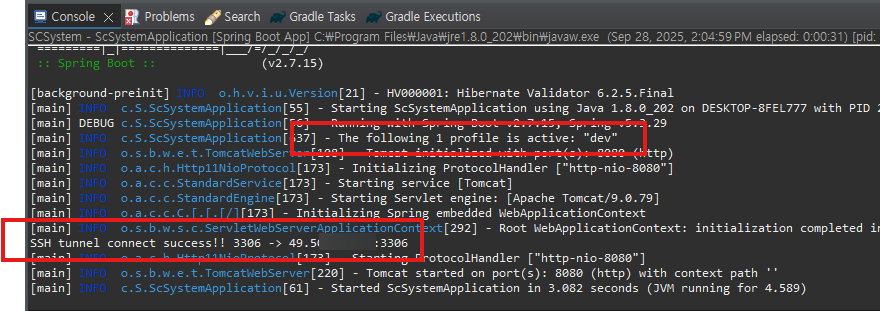
Run with the dev profile:
java -jar .\SCSystem-SNAPSHOT.jar --spring.profiles.active=devYou should see that the tunnel connects successfully.
Leave a Reply