Here’s how I wired Kakao Map REST API into a Vue CLI project so address input also fills latitude and longitude. Because it uses the REST API, you do not need an extra npm install in the project.
index.html
<script src="//t1.daumcdn.net/mapjsapi/bundle/postcode/prod/postcode.v2.js"></script>I also added the common postal-code (address search) API that you see on many address forms.
test.vue
For readability, the template and script are posted separately.
Template
<div class="col-md-3">
  <div class="form-group">
    <div class="input-group">
      <label class="labelModal" key="" for="addr">Address</label>
      <input
        type="text"
        id="addr"
        class="form-control"
        v-model="selectedAddr"
      />
      <button class="btn btn-secondary" @click="findAddress()">Find address</button>
    </div>
  </div>
  <div class="form-group">
    <div class="input-group">
      <label class="labelModal" key="" for="detail_addr">Detail address</label>
      <input
        type="text"
        id="detail_addr"
        class="form-control"
        v-model="selectedDetailAddr"
      />
    </div>
  </div>
  <div class="form-group">
    <div class="input-group">
      <label class="labelModal" key="" for="latitude">Latitude</label>
      <input
        type="text"
        id="latitude"
        class="form-control"
        v-model="selectedLatitude"
      />
    </div>
  </div>
  <div class="form-group">
    <div class="input-group">
      <label class="labelModal" key="" for="longitude">Longitude</label>
      <input
        type="text"
        id="longitude"
        class="form-control"
        v-model="selectedLongitude"
      />
    </div>
  </div>
</div>
Script
import axios from "axios";

export default {
  methods: {
    findAddress() {
      new window.daum.Postcode({
        oncomplete: (data) => {
          this.selectedAddr = data.address;

          const options = {
            headers: {
              'Authorization': 'KakaoAK ' + this.kakaoRestKey,
            }
          };

          axios.post(this.kakaoAPI + data.address, {}, options)
            .then(response => {
              const kakaoAPI = response.data;
              this.selectedLongitude = kakaoAPI.documents[0].x;
              this.selectedLatitude = kakaoAPI.documents[0].y;
            })
            .catch(error => {
              console.error('kakao API failed:', error);
              alert('kakao API failed');
            });
        }
      }).open()
    },
  },
  setup() {
    const kakaoAPI = "https://dapi.kakao.com/v2/local/search/address.json?query=";
    const kakaoRestKey = "YOUR_REST_API_KEY";
    const selectedAddr = ref();       // address
    const selectedDetailAddr = ref(); // detail address
    const selectedLatitude = ref();   // latitude
    const selectedLongitude = ref();  // longitude
  },
}
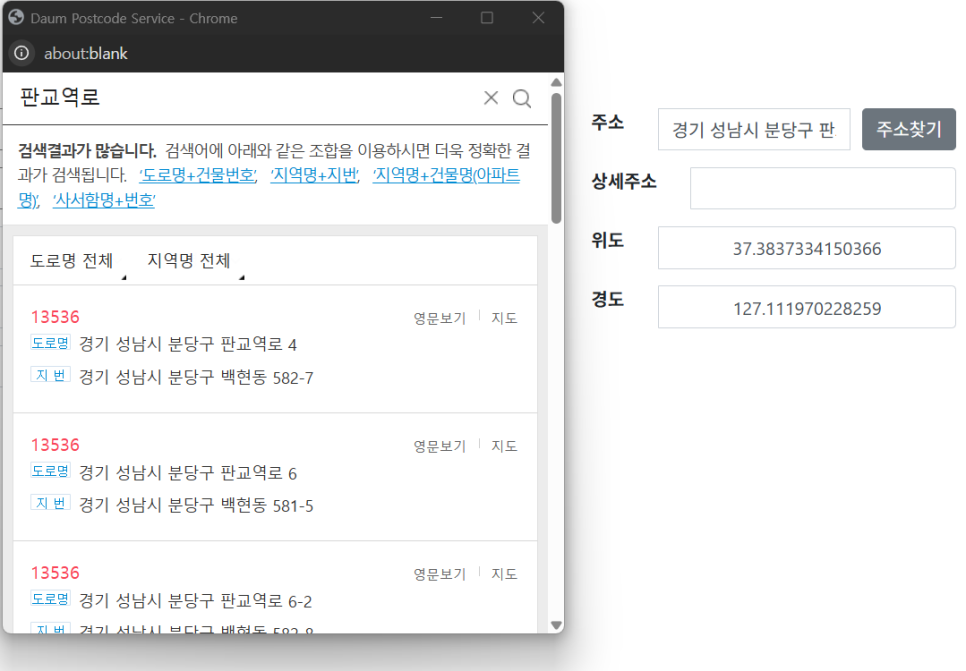
Inside findAddress, window.daum.Postcode returns the postal code and address. Then a header is built with your REST API key, Kakao Map REST API is called, and latitude/longitude are filled (x is longitude, y is latitude).
Kakao Map API key
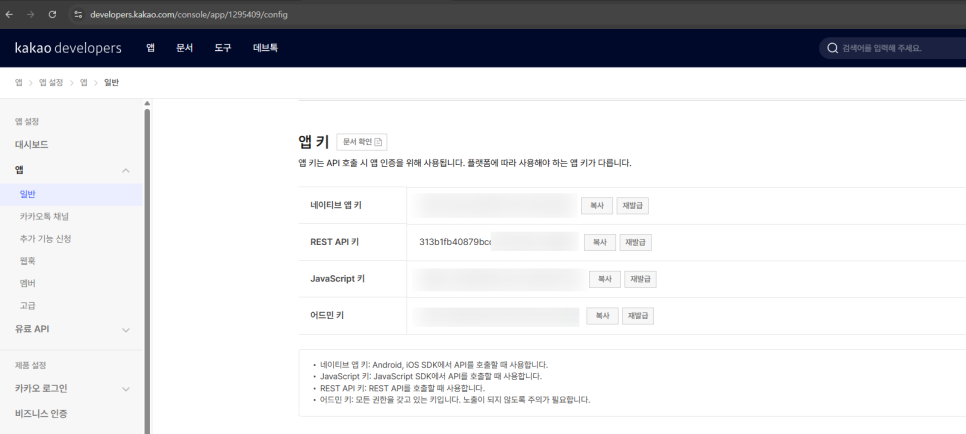
Create an app at the URL below, then in the left sidebar go to App > General > App keys, copy your REST API key, and put it in kakaoRestKey.
https://developers.kakao.com/console/app
Done.
Leave a Reply