This is a write-up of a ransomware infection at one company, from the start of the infection through the aftermath. People often say you can’t fully prevent compromises—only recover well. I wasn’t on the incident team, but the timeline is still worth documenting. Here is what happened.
Incident timeline
- Arrived at work at 09:00 and noticed something abnormal
- Confirmed files being encrypted on Windows servers, then shut down all servers
- Received an email from the hacker
- A consulting firm said the ransomware program had started running from early morning
- Confirmed that the NAS backup server was still healthy
- Restored from NAS
- Through the consulting firm, sent 1 Bitcoin to the hacker
- Received a recovery program and a vulnerability solution from the hacker (VPN was mentioned)
- About 95% of systems, including the database, were recovered, but some programs could not be restored
- For the unrestored parts, reinstalled and reconnected systems through a solution vendor at high cost
- Stopped using VPN
Immediate response
After detecting the anomaly and confirming that server files were being encrypted, all servers were shut down to stop the hacking program that was likely still running.
* They said there was effectively no response method other than detecting it as early as possible and shutting down the servers.
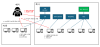
Likely attack path
Company information, employee information, and employee account details circulate on the deep web and dark web. Attackers may target companies using that data, or build a company-scale intrusion path through an infected external personal PC whose user connects via VPN.
* Deep web / dark web: networks that can only be accessed with specific software. Anonymity is guaranteed there, and they are also used as channels for moving criminal funds through cryptocurrency.
Cost assessment
The hacker operated at company scale. They said that once the requested Bitcoin is sent, they always send a decryption program together with a solution in order to build trust in the hacking field and keep the business going. The cost of the decryption program varies by company size and server age.
* They said it is rare for operators to take the money and disappear.
Situation analysis
(The image above only illustrates account theft through a keylogger. Network sniffing may also have been used, so the exact method cannot be confirmed.)
VPNs have vulnerabilities. Attackers strike before vulnerability fixes are applied, so defense is often impossible. The expected sequence was VPN account theft and access, removal of security programs, confirmation of server and account information with hacking tools such as a keylogger, intrusion, and infection.
* Keylogger: a program that sends everything a user types on a PC keyboard to the hacker.
Follow-up actions
- Introduce a solution that monitors the deep web / dark web
- Introduce disaster recovery and backup solutions
I already knew that hacking is not something done in a day or two, and that it can take weeks or months. What I learned for the first time was that company information and even information about currently employed staff circulate on the deep web and similar places.
In reality, the infection path was described as involving VPN, but only the hacker knows whether an employee connected to VPN from a PC or executed a file from a spam email received at a company address. They do not explain that precisely.
Still, seeing that they also shared the vulnerability and sent a recovery key and program made it feel, in a strange way, like a strangely human form of crime.
Leave a Reply