When should you read this?
Your Vue SPA is already on S3 + CloudFront (Part 1), but every GitHub Actions deploy blows the whole CDN cache with /*, or users keep seeing an old shell because index.html was uploaded with a year-long Cache-Control. This is Part 2 of Deploy Vue and Spring Boot on AWS with S3, CloudFront, and EC2. Start with Part 1: S3, CloudFront, and EC2 if you have not set up the stack yet. Pair with the OAC lockdown post so the bucket is not public while you tune cache headers.
The next production mistake is this: every GitHub Actions run does create-invalidation --paths "/*". That works. It also throws away hashed chunks that did not change.
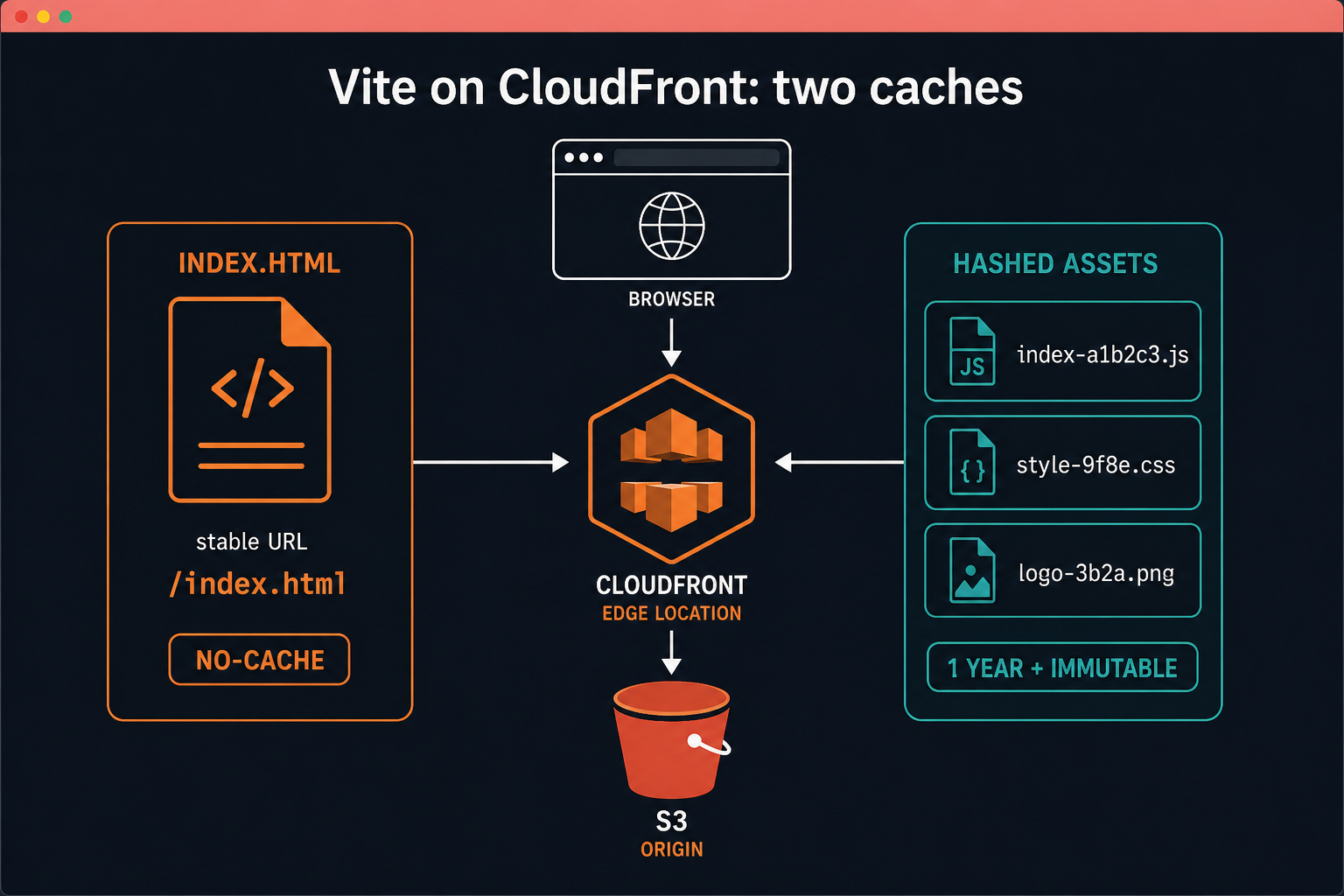
Vite names bundles by content (assets/index-a1b2c3.js). If the bytes change, the filename changes. Those objects are safe to cache for a year. index.html is the opposite: the URL never changes, but the script src inside it does. That file must not be cached like a hashed asset.
What you are building
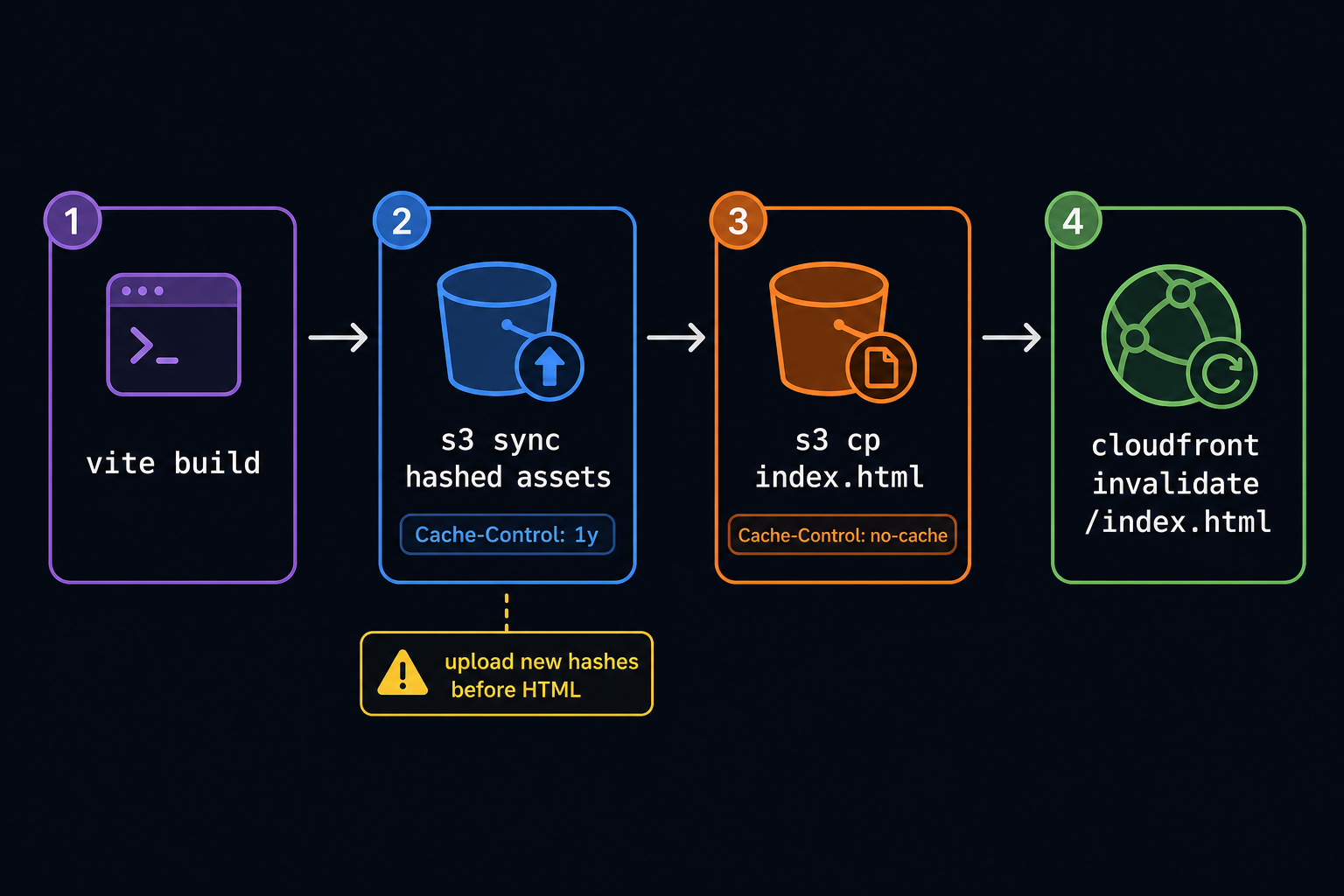
A deploy that treats Vite output as two classes of objects: content-hashed files that may live at the edge for a year, and a single HTML entry that must revalidate on every release. Invalidations become cheap and boring because they only touch that entry. Hashed filenames do the rest of the cache-busting work.
This only works if the build really emits content hashes. If your bundler writes stable names like app.js, long cache headers will strand users on old bytes until you invalidate broadly again – fix the build first, then the cache policy.
Two Cache-Control values
Do not run one aws s3 sync with a single header. Use two passes.
# 1) Hashed files first (do not delete old hashes yet)
aws s3 sync dist/ s3://YOUR_BUCKET/ \
  --exclude "index.html" \
  --cache-control "public, max-age=31536000, immutable"

# 2) Entry HTML last
aws s3 cp dist/index.html s3://YOUR_BUCKET/index.html \
  --cache-control "no-cache, no-store, must-revalidate"
Upload new hashes before the new HTML. If HTML lands first, a visitor can request a chunk that is not in S3 yet.
Skip --delete on the hashed pass during the cutover. Old tabs still load yesterday’s index.html, which still points at yesterday’s filenames. Delete stale objects later, not in the same second you publish.
Invalidate only the entry
aws cloudfront create-invalidation \
  --distribution-id YOUR_DISTRIBUTION_ID \
  --paths "/index.html" "/"
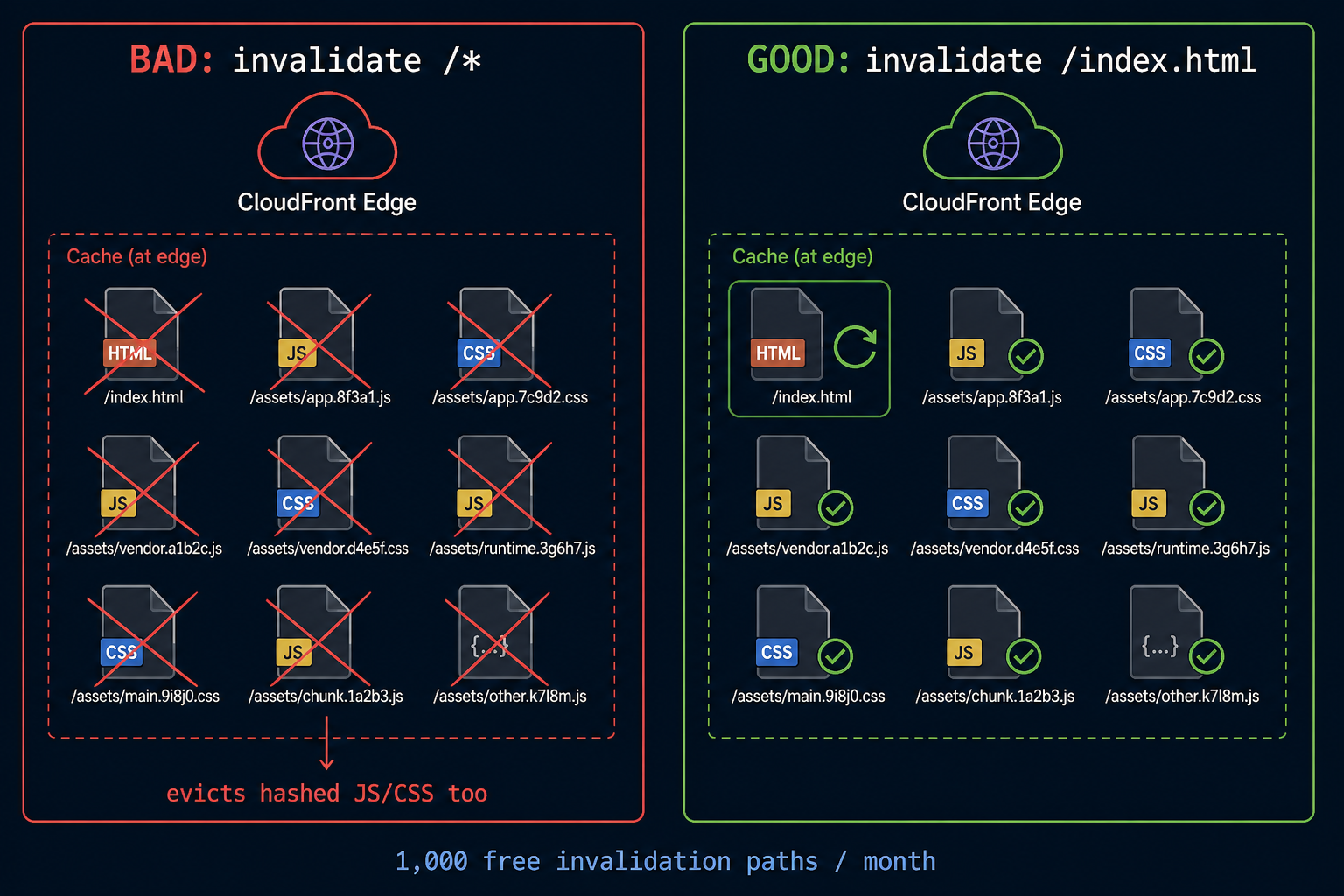
/ matters if the default root object is served as / rather than /index.html. You do not need /*.
CloudFront includes 1,000 invalidation paths per month in the free tier. A wildcard /* is one path, but it also evicts every hashed file at every edge. Path-specific invalidation is enough for an SPA.
Service workers, if you added one, are a separate cache. Busting CloudFront does not refresh a SW that pinned an old shell. Either skip SW for this SPA or version the worker carefully. Most Vue marketing/admin fronts in this series do not need a service worker at all.
GitHub Actions shape
- name: Sync hashed assets
  run: |
    aws s3 sync dist/ s3://${{ secrets.S3_BUCKET }}/ \
      --exclude "index.html" \
      --cache-control "public, max-age=31536000, immutable"

- name: Upload index.html
  run: |
    aws s3 cp dist/index.html s3://${{ secrets.S3_BUCKET }}/index.html \
      --cache-control "no-cache, no-store, must-revalidate"

- name: Invalidate entry
  run: |
    aws cloudfront create-invalidation \
      --distribution-id ${{ secrets.CLOUDFRONT_DISTRIBUTION_ID }} \
      --paths "/index.html" "/"
If users still see an old shell after deploy, check S3 metadata on index.html (Cache-Control) before you assume CloudFront is stuck. A year-long header on HTML is the usual cause.
Verify after a deploy
- curl -sI the CloudFront URL for
/index.htmland confirm Cache-Control is no-cache (or similarly short). - curl -sI a hashed asset under
/assets/and confirm max-age is about a year. - After Actions finishes, view source on the live site and confirm script src filenames match the objects you just synced.
- Invalidation status in CloudFront should list only
/index.htmland/, not/*.
Failure modes
- HTML uploaded before hashed assets – intermittent 404 on new chunks.
--deleteon sync during cutover – active tabs break on old filenames.- Still invalidating
/*– correct HTML, but you paid edge eviction for every immutable file. - Browser disk cache holding HTML despite no-cache – hard refresh once while debugging headers.
Keep Spring Boot API caching out of this path: API responses belong on the EC2/ALB origin with their own Cache-Control, not on the S3 static bucket. Mixing API JSON into the Vite bucket is how teams accidentally long-cache private payloads.
Minimal checklist
- Two-pass upload: hashed assets immutable, then index.html no-cache.
- Invalidate
/index.htmland/only. - Never rely on public S3 URLs; keep OAC (see the lock-down post).
- Confirm S3 object metadata before blaming CloudFront.




Leave a Reply