What you are building
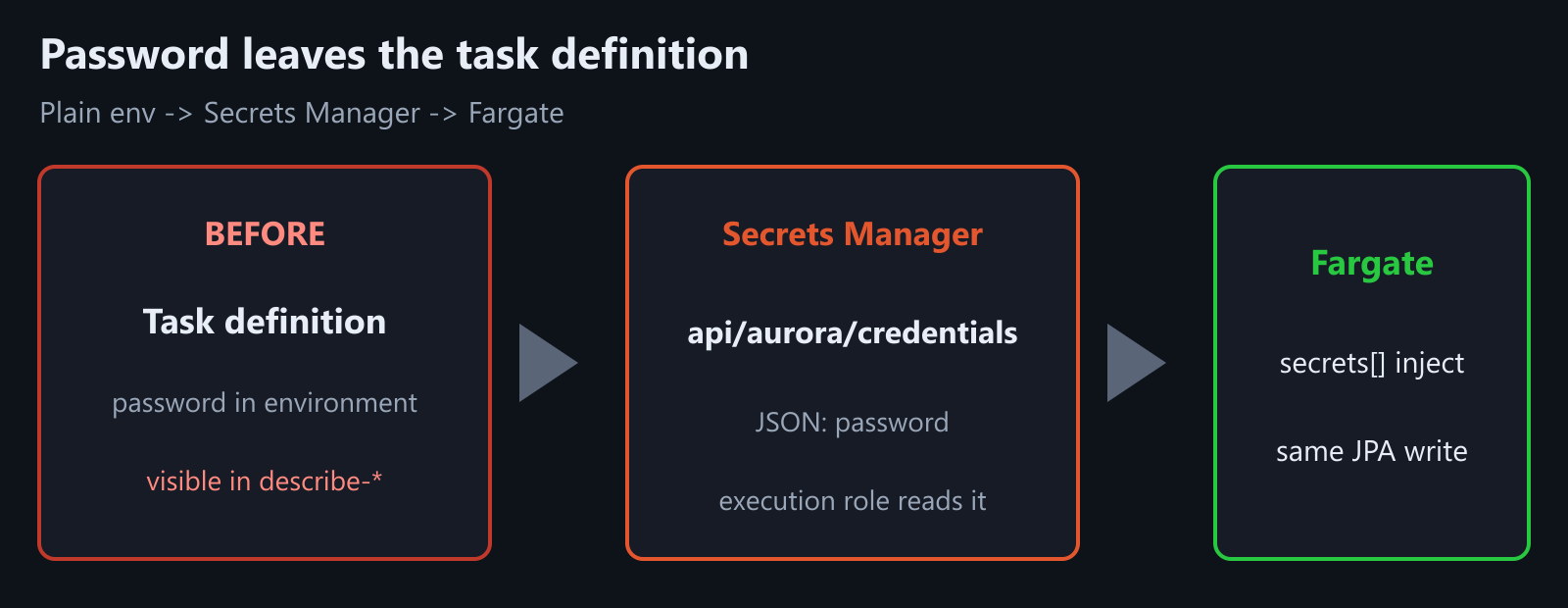
You already connect Spring Boot JPA to Aurora on Fargate. Writes work, but the password still sits in plain task-definition environment. Today: store it in Secrets Manager, inject SPRING_DATASOURCE_PASSWORD at task start, redeploy, keep the same JPA path. Spring code and Aurora SG/endpoint stay as they are.
Secrets Manager secret (JSON)
    ->  task execution role can GetSecretValue
    ->  container secrets[] maps SPRING_DATASOURCE_PASSWORD
    ->  Fargate task starts with env injected
    ->  same JPA write path as the Aurora post
Today’s checklist:
- Create the secret (JSON
password). - Grant the execution role read access.
- Register a revision with
secrets[]– no plain password in env. - Redeploy and confirm one write still works.
1) Put the password in Secrets Manager
Use a JSON secret so you can add username later without a second secret. Replace the value with the same master password you used for Aurora (do not commit it).
REGION=ap-northeast-2
SECRET_NAME=api/aurora/credentials

# Set once in this shell
DB_USER=api_app
DB_PASS='ReplaceWithALongSecret'

SECRET_ARN=$(aws secretsmanager create-secret \
  --name $SECRET_NAME \
  --secret-string "{\"username\":\"$DB_USER\",\"password\":\"$DB_PASS\"}" \
  --region $REGION \
  --query ARN --output text)

echo $SECRET_ARN
If the secret already exists, use put-secret-value instead of create-secret.
2) Let the execution role read that secret
ECS pulls secrets before the container starts. That needs the task execution role (the one that already pulls from ECR), not only the task role.
# Execution role name from the Run / Aurora posts (example)
EXEC_ROLE_NAME=ecsTaskExecutionRole
ACCOUNT_ID=$(aws sts get-caller-identity --query Account --output text)

cat > /tmp/secrets-policy.json <<EOF
{
  "Version": "2012-10-17",
  "Statement": [
    {
      "Effect": "Allow",
      "Action": ["secretsmanager:GetSecretValue"],
      "Resource": "$SECRET_ARN"
    }
  ]
}
EOF

aws iam put-role-policy \
  --role-name $EXEC_ROLE_NAME \
  --policy-name api-aurora-secret-read \
  --policy-document file:///tmp/secrets-policy.json
If the secret uses a customer-managed KMS key, add kms:Decrypt on that key for the same role. Default AWS-managed key usually needs no extra KMS line.
3) Register a revision that injects the password
Keep URL and username as normal environment if you want (non-secret). Move only the password into secrets with the JSON key suffix :password::.
ValueFrom shape:
$SECRET_ARN:password::Example container fragment (merge into your existing task definition JSON, then register-task-definition):
"environment": [
  { "name": "SPRING_DATASOURCE_URL", "value": "jdbc:postgresql://YOUR_WRITER:5432/api" },
  { "name": "SPRING_DATASOURCE_USERNAME", "value": "api_app" }
],
"secrets": [
  {
    "name": "SPRING_DATASOURCE_PASSWORD",
    "valueFrom": "arn:aws:secretsmanager:ap-northeast-2:ACCOUNT:secret:api/aurora/credentials-XXXXXX:password::"
  }
]
Use the full ARN from echo $SECRET_ARN (includes the random suffix). Remove any plain SPRING_DATASOURCE_PASSWORD from environment.
Roll the service:
CLUSTER=api
SERVICE=api

aws ecs update-service \
  --cluster $CLUSTER \
  --service $SERVICE \
  --task-definition api \
  --force-new-deployment \
  --region $REGION
4) Verify injection – and that plaintext is gone
# Task definition should list secrets, not a password environment value
aws ecs describe-task-definition \
  --task-definition api \
  --region $REGION \
  --query 'taskDefinition.containerDefinitions[0].{env:environment,secrets:secrets}'
You should see SPRING_DATASOURCE_PASSWORD under secrets only. Then hit the same write path from the Aurora post (one POST that persists). If the task stops on start with ResourceInitializationError / secret access, fix the execution-role policy or the ARN/key name before chasing JDBC URLs.
After that, the password lives in Secrets Manager, not in the task definition.




Leave a Reply