What you are building
You already alarm on ALB 5xx and alarm on Fargate CPU and memory. Those alarms only flip color in CloudWatch until you attach a destination. Today that destination is one mailing list, one confirmed ops inbox, and --alarm-actions on the same three alarms.
ALB 5xx / ECS CPU / ECS memory alarm
    ->  email notification channel
    ->  Confirm subscription once
    ->  Your inbox on ALARM
    ->  Then open /ecs/api logs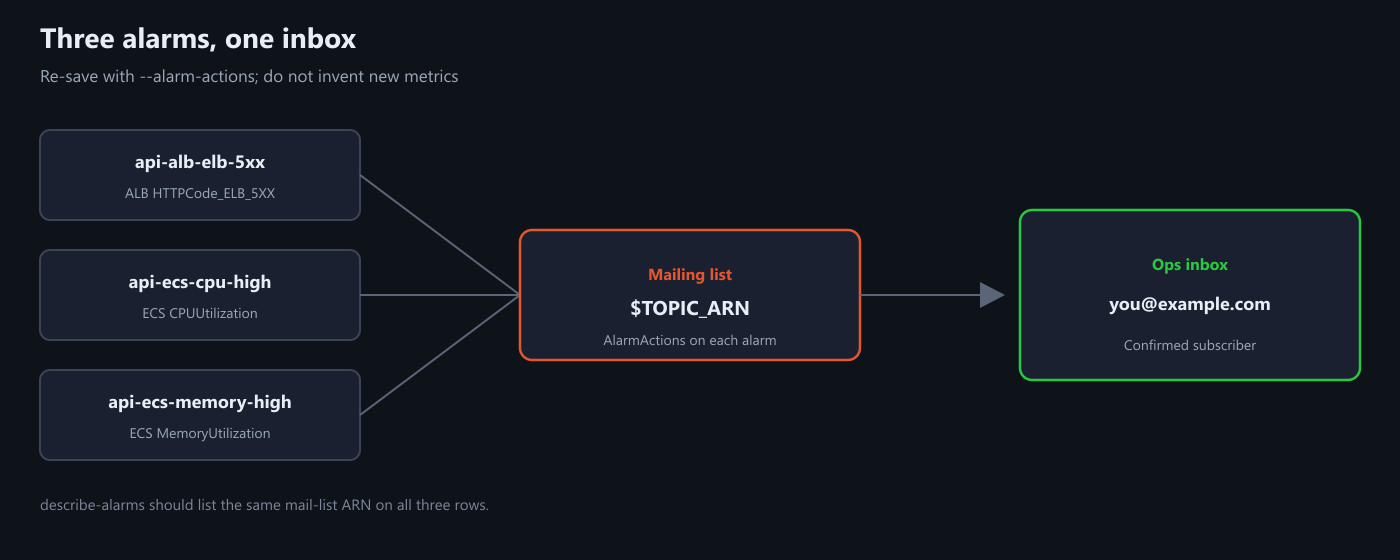
1) Make the mailing list and confirm it
Create the channel, then subscribe your address. AWS sends a confirmation mail – until you click it, nothing will deliver.
REGION=ap-northeast-2
TOPIC_NAME=api-ops-alarms
EMAIL=you@example.com

TOPIC_ARN=$(aws sns create-topic \
  --name $TOPIC_NAME \
  --region $REGION \
  --query TopicArn --output text)

aws sns subscribe \
  --topic-arn $TOPIC_ARN \
  --protocol email \
  --notification-endpoint $EMAIL \
  --region $REGION
Open the mail, click Confirm subscription, then check that the subscription is real (not PendingConfirmation):
aws sns list-subscriptions-by-topic \
  --topic-arn $TOPIC_ARN \
  --region $REGION \
  --query 'Subscriptions[*].[Endpoint,SubscriptionArn]' \
  --output table
2) Point the existing alarms at that inbox
You are not inventing new metrics. You re-save the same alarms with --alarm-actions $TOPIC_ARN so CloudWatch knows where to notify.
ALB 5xx (LB_DIM = your app/name/id after loadbalancer/):
LB_DIM=app/api/0123456789abcdef

aws cloudwatch put-metric-alarm \
  --alarm-name api-alb-elb-5xx \
  --alarm-description "ALB-generated 5xx for api; then read /ecs/api streams" \
  --namespace AWS/ApplicationELB \
  --metric-name HTTPCode_ELB_5XX_Count \
  --dimensions Name=LoadBalancer,Value=$LB_DIM \
  --statistic Sum --period 60 --evaluation-periods 1 --threshold 1 \
  --comparison-operator GreaterThanOrEqualToThreshold \
  --treat-missing-data notBreaching \
  --alarm-actions $TOPIC_ARN \
  --region $REGION
Do the same for api-ecs-cpu-high and api-ecs-memory-high (Average / 60s / 2 periods / 80, dimensions ClusterName + ServiceName from the CPU/memory post) – only add --alarm-actions $TOPIC_ARN.
Quick check:
aws cloudwatch describe-alarms \
  --alarm-names api-alb-elb-5xx api-ecs-cpu-high api-ecs-memory-high \
  --region $REGION \
  --query 'MetricAlarms[*].[AlarmName,AlarmActions]' \
  --output table
Each row should show your $TOPIC_ARN.
3) Send one test mail without breaking traffic
Force ALARM on the ALB alarm, check inbox (and spam), then set it back to OK:
aws cloudwatch set-alarm-state \
  --alarm-name api-alb-elb-5xx \
  --state-value ALARM \
  --state-reason "manual email alarm test" \
  --region $REGION

aws cloudwatch set-alarm-state \
  --alarm-name api-alb-elb-5xx \
  --state-value OK \
  --state-reason "manual email alarm test complete" \
  --region $REGION
No mail? Confirmation still pending, wrong region/ARN, or AlarmActions empty – fix those before chasing DNS.
When a real mail arrives later: open ECS, grab the failing or hot task, then read the Fargate log stream.
Minimal checklist
- Confirmation done – subscription ARN is not PendingConfirmation.
- ALB 5xx and both ECS resource alarms list the channel under AlarmActions.
- One test ALARM produced a mail; state returned to OK.
- Real ALARM -> read
/ecs/api, then fix the app or size.
After that, ALB and Fargate resource alarms reach email instead of waiting for someone to stare at the console.




Leave a Reply